Products

One Platform. Purpose Built AI Products

Agomonia Labs products prove the platform across document intelligence, conversation recording intelligence, secure MCP integration, video intelligence, talent management readiness, finance and tax readiness, restaurant intelligence, sports analytics, cultural knowledge, and operational workflows.

Product portfolio Reusable platform, vertical outcomes

01 / DocIntel

Document-heavy teams get a governed RAG intelligence layer.

DocIntel connects document ingestion, Conversation Assistant recordings, transcripts, voice, and video intelligence with hybrid retrieval, grounded chat, summaries, comparison, evaluation, audit history, Guest Preview file upload with Q&A, Help Center product guidance, and vertical Agentic AI workflows for healthcare, talent, finance, real estate, restaurant, and operational decisions in one product foundation.

Guest previewVideo knowledgeHelp Center

02 / Video Intelligence

Recordings become searchable, timestamped knowledge.

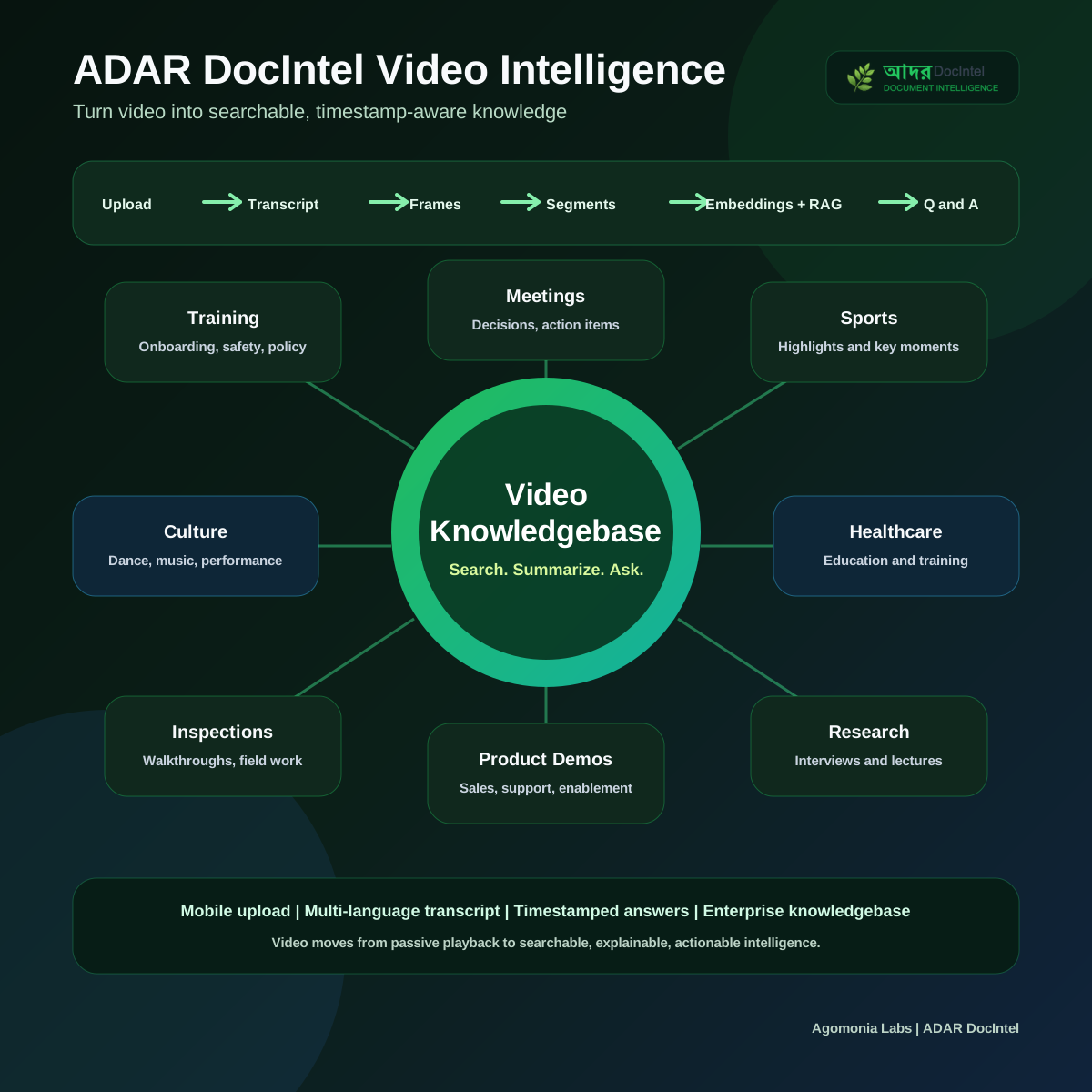
Teams can upload trainings, meetings, webinars, sports highlights, cultural performances, healthcare education, inspections, walkthroughs, customer videos, legal recordings, research interviews, and product demos, then ask timestamp-aware questions from the same DocIntel knowledge base.

Large video uploadTimeline Q&AFrame captions

03 / MCP Integration

Enterprise AI clients can access DocIntel through governed MCP.

DocIntel MCP exposes document, speech, and video intelligence to AI assistants, enterprise applications, agent frameworks, and automation platforms through a secure gateway with OAuth discovery, dynamic client registration, PKCE login, email MFA, scoped consent, token introspection, workspace enforcement, and short-lived internal credentials.

OAuth + PKCEMCP toolsScoped resources

04 / Restaurant AI

Restaurant knowledge becomes searchable, order-ready intelligence.

Owners can scribe menu data, approve extracted rows, support text or voice menu search, accept carryout or advance dine-in orders, connect dine-in orders to table bookings, and use feedback intelligence to improve recommendations.

Menu scribeCarryout + dine-inTable bookingFeedback AI

05 / Sports AI

Cricket leagues get a multilingual conversation assistant.

ADAR Sports answers questions using live scorecards, schedules, team stats, player stats, rules, standings, and text or voice conversation in six languages.

Live web dataRules agent6 languages

06 / Geetabitan

Rabindra Sangeet discovery becomes conversational and cultural.

ADAR Geetabitan supports Bengali song discovery by lyric line, emotion, mood, raga, theme, notation, playback, and evaluated answers for learners and performers. Now available as a free native app on iOS.

Bengali voiceRaag / taalNotationiOS app
See the iOS app demo

07 / Mobile

Products work from desktop workflows to phone conversations.

Responsive DocIntel experiences let users search, chat, review summaries, process orders, manage workflows, and continue AI-assisted work from mobile or web browsers.

Responsive UIVoice workflowsSelf-service
Watch the DocIntel mobile experience

08 / Lease Intelligence

Lease documents become cited, structured business intelligence.

DocIntel Lease Intelligence extracts financial terms, critical dates, obligations, clauses, risk signals, and persona-specific answers on top of the conversational RAG foundation.

Lease termsRisk reviewCited answers

09 / Finance and Tax Planning

Tax readiness expands into financial planning readiness.

Finance and Tax Planning classifies tax and financial documents, extracts exact values, creates tax organizers, calculates planning snapshots, detects missing planning documents, and prepares reviewed packets.

Tax packetNet worthAdvisor review

10 / Talent Management

Resume screening becomes evidence-backed readiness.

Talent Management Readiness turns resumes, job descriptions, interview notes, performance reviews, skills matrices, career goals, and evaluations into candidate profiles, employee growth profiles, semantic role matching, evidence matrices, gap analysis, validation questions, and reviewed talent packets.

Semantic matchEvidence matrixCandidate packet

11 / ADAR Front Desk

Appointment scheduling becomes a voice and chat conversation.

ADAR Front Desk checks live availability, holds a slot inside a transaction, confirms name/phone/email back before booking, and emails a confirmation only once the caller accepts. One deployment can serve multiple practices and providers, each with its own live admin console for providers, hours, appointment types, and a bookings calendar.

Voice + chatMulti-practiceLive admin console
Try the complete Front Desk experience

Product portfolio

Choose the operational outcome you need first.

Each product can stand on its own and can also expand through the shared ADAR platform, developer APIs, MCP, observability, and governed enterprise workflows.

First-Class Platform Capability

DocIntel Observability for Agentic AI Traces

DocIntel Observability uses OpenTelemetry and a DocIntel trace projection to make chat, ingestion, embedding, retrieval, reranking, prompt building, LLM generation, MCP calls, video processing, and vertical workflows reviewable. The newest observability layer adds metric rollups, SLO tracking, alerts, notifications, and quality correlation so teams can monitor request success, p95 latency, retrieval evidence, MCP/tool reliability, and evaluation quality.

Trace every workflow

Connect user requests to spans for usage checks, query embedding, hybrid retrieval, reranking, prompt construction, agent context, model generation, ingestion, embedding, and workflow actions.

Operate with SLOs

Track request success, p95 latency, retrieval evidence, tool reliability, evaluation quality, burn-rate status, open alerts, and correlated trace outcomes.

Store for review

Use Postgres for product UI review, Cloud Trace for engineering investigation, and GCS for durable trace archives, retention, incident reconstruction, and compliance-oriented sampling.

Operate with trust

Capture timing, status, metadata, safe previews, LLM events, and redacted attributes so Agentic AI systems can be debugged and governed without exposing secrets by default.

Foundational Product

ADAR DocIntel: the RAG layer for document-heavy systems.

DocIntel turns static documents, guided conversation recordings, transcripts, audio, and videos into a secure, searchable, conversational knowledge base with hybrid retrieval, citations, timestamp-aware sources, summaries, multilingual voice/chat, Guest Preview upload and Q&A, Help Center product assistance, and vertical agent workflows for healthcare, talent management, restaurants, real estate leases, finance and tax readiness, and other document-heavy operations. The platform combines rules for precision, embeddings for discovery, AI for reasoning, workflow orchestration for consistency, and human review for trust.

IngestRecord ConversationProcess VideoExtractChunkEmbedRetrieveChatEvaluateAudit

How DocIntel Works

Knowledge becomes cited answers and repeatable workflows.

DocIntel combines OCR, layout understanding, table extraction, guided conversation capture, speech-to-text transcripts, video metadata processing, sampled frames, timeline segmentation, semantic retrieval, and LLM reasoning to help teams ask questions, summarize long content, compare knowledge sources, and run domain-specific workflows. Users can start with a Guest Preview to upload files and ask questions before deeper onboarding, use Conversation Assistant to record consent-based discussions, then rely on Help Center Q&A when they need product guidance beyond a static user guide. Every response is grounded in retrieved evidence and can be traced back to the original source, including timestamps for conversations and processed videos.

01Documents + Conversations + Videos
02Extract + Structure
03Knowledge Index
04AI Reasoning
05Cited Answers + Workflows

Complete Platform Walkthrough

Watch the entire DocIntel platform in one video.

One walkthrough, start to finish: document, audio, and video ingestion, the hybrid retrieval architecture behind every answer, grounded chat with citations, summaries, document comparison, governance and audit, the developer platform's REST and OAuth surface, and native MCP access.

IngestRetrieveChatCompareAuditDeveloper PlatformMCP
Watch full screen

Conversation Assistant Workflow

Record Conversations Into Searchable Workspace Knowledge

DocIntel Conversation Assistant lets users capture consent-based conversations from web or mobile using speech or typed responses. The assistant can greet participants, guide the discussion, persist each turn, transcribe audio, update structured fields, and finalize the session into a reviewed transcript document that becomes part of the same workspace knowledge base.

After finalization, the conversation transcript is stored, segmented by time, chunked, embedded, and made available for grounded Q&A across the same or multiple workspace documents. Teams can reuse this pattern for customer intake, expert interviews, operational updates, healthcare discussions, field notes, research conversations, and other knowledge-gathering workflows.

01AI Greeting

Start a guided session with workspace, template, language, and consent context.

02Speech or Text Turns

Capture participant responses by microphone or typed input while each completed turn is persisted.

03Transcript + Structure

Convert audio into transcript segments, update collected fields, and return the next assistant prompt.

04Review + Finalize

Review or edit the transcript before publishing the conversation as a document-owned knowledge asset.

05Chunk + Embed

Segment the reviewed transcript, create embeddings, and add it to workspace retrieval.

06Workspace Q&A

Ask grounded questions across the conversation, documents, transcripts, and videos in the same knowledge base.

Summarization

Executive summaries, section summaries, risks, obligations, timelines, and key decisions from long documents.

Comparison

Side-by-side contract, policy, report, claim, proposal, or version comparison with cited evidence.

Conversation Assistant

Consent-based speech or text conversations become reviewed transcript documents, timestamped chunks, embeddings, and searchable workspace knowledge.

Domain Workflows

Business-specific rules, checklists, and output schemas for regulated and document-heavy work.

Guest Preview

Prospective users can upload files, ask questions, and experience grounded DocIntel Q&A before a full workspace or subscription rollout.

Help Center

Users can ask product and how-to questions in a guided Help Center when they need answers beyond the user guide.

Video Intelligence Workflow

Transform Videos Into Timestamped Knowledge

DocIntel treats video as an enterprise knowledge source, not a passive media file. The workflow routes uploads by file size, extracts metadata, frames, transcripts, and time segments, then turns the result into searchable RAG knowledge that can support chat, citations, summaries, and operational insights.

01🎥 Video Upload
02📏 File Size Check
Small VideoStandard Upload
Large VideoDirect Cloud Upload
03⚙️ Video Processing
04📊 Metadata + 🖼️ Frames + 📝 Transcript + ⏱️ Segments
05🧩 Timestamped Chunks
06🔍 Embeddings + RAG
07💬 Chat with Video Knowledgebase
08✅ Timestamp-aware answers, citations, summaries, and insights

DocIntel Video Intelligence

Turn Videos Into Searchable, Actionable Knowledge

DocIntel now supports videos as a first-class knowledge source alongside PDFs, scans, forms, transcripts, and Conversation Assistant voice workflows. Teams can upload trainings, meetings, webinars, inspections, walkthroughs, sports highlights, cultural performances, healthcare education, product demos, customer calls, legal recordings, research interviews, and operational clips, then process them into timestamp-aware knowledge that works with the same RAG and chat foundation.

The workflow handles direct browser-to-GCS upload for larger videos, creates a video document record, extracts technical metadata such as duration, resolution, codec, bitrate, frame count, and audio availability, samples frames with bounded controls, builds timeline segments, captures transcript or audio signals when available, generates visual captions, stores chunks and metadata, and embeds video chunks into pgvector for grounded Q&A.

Watch full screen

Intelligence Profiles in Action

Different videos require different ways of understanding.

Standard recordings are often driven by speech. Sports and cultural performances carry meaning through motion, timing, expression, spatial context, and sequences of visual events. DocIntel applies profile-aware processing while keeping the same durable upload, checkpoint, retrieval, citation, and knowledgebase foundation.

Sports Video Intelligence

From game footage to searchable moments and evidence.

See a cricket clip become timestamped sports knowledge through transcript, frame, motion, event, and retrieval signals. Ask what happened, find key plays, and connect the answer to the supporting moment. The pattern extends to any sport.

MotionEventsPlayersTimelineGrounded Q&A
Watch sports demo
Cultural Performance Intelligence

Understand performance through movement, expression, rhythm, and context.

Follow a Kathak performance through multimodal processing and multilingual Q&A. DocIntel connects speech, music, frames, gestures, expression, temporal structure, and cultural context so viewers can study and verify what the performance communicates.

MovementExpressionRhythmContextMultilingual Q&A
Watch cultural demo

Industry Use Cases

Video intelligence helps every persona search, summarize, verify, and act.

Many organizations already have valuable knowledge locked inside recorded demos, trainings, meetings, inspections, interviews, highlights, support calls, performances, and operational walkthroughs. DocIntel turns those recordings into searchable, timestamp-aware knowledge so each persona can ask questions, find moments, summarize long media, capture decisions, review evidence, and connect video insights with the rest of the enterprise knowledge base.

ADAR DocIntel Video Intelligence use cases across personas and industries
Training and enablementOnboarding, compliance, safety, product training, and internal education can become searchable summaries with action items and review points.
Meetings and webinarsExecutives, operations teams, sales teams, and support teams can extract key topics, timestamps, decisions, follow-ups, and reusable knowledge.
Sports and coachingPlayers, coaches, analysts, and league teams can ask when a goal, wicket, play, or key moment happened and review timestamped highlights.
Cultural performancesTeachers, performers, researchers, and learners can analyze music, dance, narration, sections, movement patterns, and performance highlights.
Healthcare educationClinicians, care teams, patients, and coordinators can search patient education, clinical training, procedure videos, and care instructions.
Inspections and walkthroughsReal estate, construction, insurance, equipment, lease, and field service teams can turn walkthrough videos into reviewable evidence.
Customer experienceService leaders and product teams can analyze feedback videos, support conversations, store walkthroughs, and experience signals.
Legal, compliance, and researchLegal teams, compliance reviewers, researchers, and interview teams can find relevant statements, policy references, timestamps, and long-form insights.

DocIntel Ingestion Workflow

Watch the full lifecycle from upload to AI-powered retrieval.

This walkthrough shows how DocIntel ingests files, validates security, extracts content, enriches metadata, creates embeddings, indexes governed knowledge, and connects the result to search, chat, agents, analytics, and business workflows.

UploadValidateOCRNormalizeEnrichIndex
Open on YouTube

Demo Narration

Document ingestion turns raw files into governed AI-ready knowledge.

The demo story follows the full ingestion lifecycle: accept business files, validate and secure them, extract usable content, enrich metadata, create embeddings, index knowledge, and prepare the result for search, chat, analytics, agents, and workflow automation.

01Document upload

PDF, Word, Excel, PowerPoint, images, emails, and text files enter the workspace.

02Validation and security

File type checks, malware scanning, governance policy checks, and metadata capture run first.

03Extraction and OCR

Text, tables, images, and document metadata are extracted, with OCR applied when needed.

04Normalization

Content is standardized into a consistent structure for downstream processing.

05AI enrichment

Summaries, classifications, keywords, entities, and business metadata are generated.

06Chunking and embeddings

Documents are segmented into semantic chunks and transformed into vector embeddings.

07Indexing

Structured content, metadata, and embeddings are indexed for fast search and retrieval.

08Governance and compliance

PII detection, redaction, retention policy, audit tracking, and traceability are applied.

09Knowledge access

Users can search, chat, summarize, analyze, and retrieve insights from ingested content.

10Workflow automation

Enriched knowledge connects to business workflows, vertical agents, analytics, and AI applications.

Retrieval, Chat, Evaluation, and Governance

See how DocIntel turns indexed content into trusted answers.

This walkthrough explains hybrid retrieval, grounded chat, summaries, document comparison, answer evaluation, audit logs, and traceability. It shows how DocIntel moves from retrieved evidence to cited answers, quality checks, and a reviewable history of every AI interaction.

Hybrid SearchGrounded AnswerSummaryCompareEvaluateTrace
Open on YouTube

Demo Narration

After ingestion, DocIntel follows a governed intelligence path.

The demo story is organized as a sequence of production behaviors: retrieve the right evidence, answer from that evidence, summarize and compare content, evaluate quality, and preserve the audit trail.

01Hybrid retrieval

Semantic vector search and exact full-text search work together, then ranking brings forward the strongest evidence.

02Grounded chat

Users ask questions in natural language and receive answers grounded in retrieved document context with source citations.

03Summaries

DocIntel produces executive, detailed, section-level, and custom summaries from long documents or selected content.

04Compare

Teams compare contracts, policies, reports, or document versions to find differences, missing items, obligations, and risks.

05Evaluation

Responses and workflow outputs are checked for relevance, completeness, citation quality, faithfulness, and useful format.

06Audit log

Admins can review user, workspace, timestamp, question, answer, feedback, and workflow activity for governance.

07Traceability

Every important AI interaction can be traced through retrieved chunks, ranking, prompt context, model response, and cited sources.

First-Class Product Offering

DocIntel MCP Integration for Enterprise AI Clients

DocIntel MCP Integration securely extends ADAR DocIntel beyond its native web UI through a public Model Context Protocol server. AI assistants, enterprise applications, agent frameworks, and automation platforms can connect to DocIntel's document, speech, and video intelligence knowledgebase through one governed integration layer without rebuilding ingestion, retrieval, authorization, workflow logic, or enterprise knowledge storage.

Public MCP endpoint https://mcp.docintel.adar.agomoniai.com/mcp
Claude Desktop Cursor VS Code Codex-style agents Internal assistants Enterprise agent platforms

Secure MCP Gateway

Let trusted AI clients query DocIntel with workspace, user, and scope boundaries.

The MCP gateway is a separately deployable adapter over the existing DocIntel API. It does not connect directly to PostgreSQL, pgvector, Google Cloud Storage, or private application data stores. The gateway accepts MCP requests, validates identity, client, audience, expiration, and approved scopes through OAuth, forwards trace context, and calls DocIntel through controlled backend credentials so the DocIntel API remains the authority for tenant, workspace, document, and session access.

This gives organizations a practical integration path for AI assistants, coding agents, knowledge workers, and internal copilots that need access to trusted enterprise knowledge. A user can work inside an MCP-compatible client, ask grounded questions across authorized PDFs, policies, contracts, speech transcripts, videos, healthcare packets, financial records, lease documents, or talent intelligence, and continue contextual conversations without moving files or sharing permanent credentials.

Current MCP Surface

Authorized clients can discover workspaces, ingest and inspect documents, process speech and video, read timeline resources, run grounded Q&A and summaries, manage sessions, execute governed vertical workflows, support human review and packet operations, and use batch processing. REST and MCP activity share usage governance, quota enforcement, trace correlation, and workspace authorization.

01Discover resource

The MCP client discovers the DocIntel MCP endpoint and protected-resource metadata.

02Find authorization server

The client discovers the DocIntel OAuth authorization server and supported endpoints.

03Register client

Approved clients register dynamically or use configured client policy before requesting access.

04Login with MFA

The user signs in through DocIntel identity with password and email MFA.

05Review scopes

The user consents to scopes such as workspace read, document read, knowledge query, and session write.

06Code + PKCE

The browser flow returns an authorization code protected by S256 PKCE.

07Short-lived MCP token

The client receives an audience-bound access token and rotating refresh token.

08Gateway validation

The MCP gateway validates and introspects the token, then enforces user, workspace, and scope boundaries.

09Internal credential

The public MCP token stops at the gateway; backend calls use a short-lived internal credential.

10Grounded response

DocIntel returns grounded answers, citations, metadata, resources, or session results from authorized documents, speech, and video knowledge.

Tools

Current MCP tool families

Workspace discovery Document upload and ingestion Chunks and embeddings Video upload and processing Summaries and comparison Grounded chat sessions

Resources

Current MCP resources

docintel://workspaces/{workspace_id}/documents docintel://documents/{document_id} docintel://documents/{document_id}/chunks docintel://sessions/{session_id} docintel://videos/{document_id}/timeline docintel://videos/{document_id}/transcript
Scoped capabilities

Every tool requires both an operator-enabled capability and a caller-granted OAuth scope.

Workspace enforcement

Workspace and document IDs narrow the request, but never grant access by themselves.

Token boundary

Audience-bound MCP tokens are validated at the gateway and are not forwarded to DocIntel application APIs.

Safe operations

Tokens and unrestricted sensitive payloads are excluded from gateway logs. Trace IDs, normalized operations, quotas, and bounded telemetry support operational correlation.

Developers and integration engineers

Connect applications and AI clients to DocIntel without rebuilding document ingestion, hybrid retrieval, speech/video processing, authorization, and workflow services.

AI architects and agent builders

Create connected copilots and agent workflows that use standard MCP tools while preserving DocIntel's grounding, citations, sessions, and workspace rules.

Security, IAM, and compliance teams

Retain MFA, least-privilege scopes, tenant isolation, workspace boundaries, token controls, monitoring, traceability, and auditability.

Business and domain users

Use authorized enterprise knowledge from preferred AI clients while DocIntel keeps files, sessions, and governed knowledge inside controlled systems.

DocIntel Developer Platform

One governed integration surface for REST applications, MCP clients, agents, and automation. It combines human and service OAuth, workspace-scoped documents and multimodal knowledge, durable batch and video operations, vertical workflows, signed webhooks, shared quotas, credential rotation, OpenTelemetry correlation, OpenAPI, and starter SDKs.

DocIntel Observability

OpenTelemetry-based tracing for chat, ingestion, embedding, retrieval, reranking, LLM generation, MCP calls, video processing, and vertical workflows. Trace data now supports SLOs, alerts, metric rollups, notifications, quality correlation, Postgres UI review, Cloud Trace diagnostics, and GCS archival.

ADAR Eats Menu, Ordering, and Table Booking

Restaurant owner/member audio intake in English, Spanish, Bangla, Hindi, or Arabic. Extract profile details and menu prices, approve rows, then let customers search, compare, place paid carryout orders, preorder food for dine-in, and reserve a table tied to the dine-in order.

DocIntel Mobile Experience

Responsive web and mobile access lets customers, restaurant owners, healthcare staff, and business users continue conversations, review documents, place orders, check summaries, and manage workflows from phone, tablet, laptop, or desktop browsers.

DocIntel Guest Preview and Help Center

Guest Preview gives users a low-friction way to upload files and test Q&A before adopting a full workspace. Help Center adds an in-product assistant for product usage, onboarding, workflow guidance, and common questions beyond the static user guide.

DocIntel Talent Management and Employee Growth Readiness

Resumes, job descriptions, interview notes, skills matrices, performance reviews, career goals, and candidate or employee evaluations become structured HCM workflows with candidate profiles, employee growth profiles, semantic role matching, evidence matrices, development gap analysis, manager validation questions, feedback reconciliation, mobility-readiness assessment, auditable change history, and human-reviewed talent packets.

ADAR Knowledge Academy

Grounded multimodal learning with courses, modules, lessons, an evidence-backed AI Tutor, study tools, assignments, mastery tracking, instructor intelligence, and human guidance. Available for $125/month or $1,200/year.

ADAR Sports

Cricket assistant with live web scraping, latest scorecards, team stats, player stats, rules retrieval, standings, LLM-as-judge evaluation, and text/voice conversation in English, Bangla, Hindi, Arabic, Spanish, and Urdu.

Geetabitan Adar

Rabindra Sangeet AI assistant with Bengali search, raag/taal filters, notation, voice, and evaluated answers.

Adar Restaurants Recommender

Food recommendation assistant that uses restaurant discovery, approved menu data, dish price comparison, voice search, rating badges, verified feedback, and ranking agents.

ADAR Front Desk

Voice and chat appointment scheduling assistant. Checks live availability, holds a slot inside a transaction so it can never be double-booked, confirms name/phone/email back before booking, and emails a confirmation the moment it is accepted. Serves multiple practices and providers from one deployment, with a live admin console for providers, working hours, appointment types, and a bookings calendar. Available for $50/month or $450/year.

ConversationAvailabilityHoldBookingCalendar
Try Front Desk

Finance and Tax Planning Workflow

Financial documents move through a repeatable workflow from intake to intelligence, readiness views, advisor packet PDF creation, approved packet upload, and human approval.

DocumentsIntelligenceReadinessPDF PacketHuman Review

Finance and Tax Planning Readiness

Finance workflow that starts with Tax Submission Readiness and extends into Financial Planning Readiness. It combines OCR, classification, embeddings, deterministic extraction, regex, AI reasoning, missing-item detection, prior-year comparison, net worth and cash-flow snapshots, human review, CPA/EA packets, advisor packet PDF creation, approved packet upload into the workspace, and advisor-ready planning packets across tax returns, brokerage statements, retirement records, mortgage documents, bank statements, credit cards, property records, and client notes.

Restaurant Feedback Intelligence

Customers can submit text or voice feedback on restaurants, menu items, or verified carryout orders. AI suggests rating scores, sentiment, and tags such as taste, value, portion, freshness, spice, packaging, wait time, and accuracy.

Restaurant Operations Pattern

Reference architecture for POS, inventory, customer experience, locations, memory, and natural-language operations analytics.