Developers/MCP

Agent and AI integration

DocIntel MCP server

Connect AI assistants, enterprise applications, agent frameworks, and automation to governed document, conversation, speech, video, knowledge, and vertical workflow intelligence.

Public endpointhttps://mcp.docintel.adar.agomoniai.com/mcp
OAuth issuerhttps://auth.docintel.adar.agomoniai.com
ProtocolMCP 2025-06-18 over Streamable HTTP
OAuth-secured and workspace governed

Product Offering

Governed MCP Access to DocIntel Knowledge

DocIntel MCP Integration is not just another API. It is a secure interoperability layer for enterprise AI. Clients can discover DocIntel as an MCP resource, request user-approved scopes, call approved tools, read authorized resources, upload documents or videos through controlled flows, create governed conversation recordings, approve transcripts, ask grounded questions, summarize, compare, create chat sessions, and continue contextual conversations while DocIntel remains the system of record for identity, workspace membership, scope grants, document access, retrieval, citations, workflow state, and auditability.

OAuth discovery Dynamic registration PKCE + MFA Scoped consent Tool calls Resource reads Conversation recordings Direct upload Grounded Q&A Vertical workflows PDF packets Batch operations Scope validation MCP Playground
ADAR DocIntel MCP OAuth flow across MCP client, authorization server, MCP gateway, and DocIntel knowledgebase
The public MCP token stops at the gateway. The gateway validates identity, audience, expiration, client, and scopes, then DocIntel independently enforces user, workspace, document, and session authorization.

MCP Playground

Connect Enterprise Knowledge Through MCP

ADAR DocIntel MCP Playground provides a secure, interactive environment for exploring DocIntel tools, resources, conversation recording workflows, vertical workflows, batch operations, and knowledge services through the Model Context Protocol. Users can connect through OAuth, choose an access profile, discover available capabilities, search examples, edit command templates, run governed MCP commands, and review formatted responses directly from the browser without configuring a local terminal.

Experience MCP from the browser

The Playground helps developers evaluate integrations, architects validate security and interoperability, operations teams explore workflows, and business reviewers understand how DocIntel capabilities can be accessed from AI assistants, agents, applications, and enterprise platforms.

OAuth 2.0 with PKCE protects client authorization. Access and refresh tokens remain encrypted on the server and are never exposed to browser JavaScript. Workspace permissions, user-level scope grants, requested workflow profiles, human approval gates, response limits, and confirmation requirements remain enforced throughout the workflow.

01Sign in to DocIntel
02Connect through OAuth
03Discover tools and resources
04Search or select a command
05Customize identifiers and inputs
06Run through the governed MCP gateway
07Review formatted, grounded results
Discover tools, schemas, and resources Navigate workspaces and documents Upload, chunk, embed, and manage content Ask grounded enterprise questions Generate summaries and compare documents Create persistent chat sessions Capture conversation recordings and publish reviewed transcripts Process and query video intelligence Run batch upload, classification, embedding, and workspace summaries Run healthcare, finance, talent, lease, and other vertical workflows Perform human review and approval Generate governed PDF packets Request missing scopes for administrator approval

MCP Integration Demo

Watch DocIntel MCP Integration in Action

This walkthrough shows how ADAR DocIntel exposes enterprise knowledge through the current MCP server, tools, resources, OAuth flow, and browser MCP Playground. It explains how users can securely connect, explore command examples, call tools, read resources, inspect formatted results, and understand how a compatible MCP client can integrate with DocIntel.

From OAuth login to governed MCP commands

The demo covers the existing MCP server, protected-resource discovery, OAuth authorization, tools list, resources list, and Playground commands for accessing workspaces, documents, knowledge services, sessions, summaries, comparisons, video intelligence, and batch operations. It also shows command-line MCP integration patterns for document upload, chunking, embedding, and chat over DocIntel knowledge.

Current MCP Integration coverage includes document and video upload, batch upload, separate batch classification and embedding, workspace summaries, ingestion status, grounded Q&A, summarization, comparison, persistent sessions, tool calls, resource reads, OAuth-secured browser testing, and domain vertical workflow support. Vertical workflow tools can trigger healthcare, finance and tax, talent, employee mobility, and lease workflows, monitor runs, support human review and approval, and generate governed PDF packets where supported.

OAuth Flow

From MCP Client Discovery to Grounded DocIntel Answers

The end-to-end flow starts when an MCP client discovers the DocIntel protected resource and authorization server. The client registers or identifies itself, opens a browser login, requests least-privilege scopes, completes password authentication and email MFA, receives an authorization code protected by PKCE, exchanges it for an audience-bound MCP token, and then calls DocIntel tools through the MCP gateway. The gateway validates and introspects the token, enforces granted scopes, avoids forwarding the public token to application APIs, and returns only authorized grounded knowledge.

01Discover MCP resource

Client reads protected-resource metadata for the public MCP endpoint.

02Discover OAuth issuer

Client finds authorization, token, registration, and revocation endpoints.

03Register client

Dynamic registration or approved client metadata establishes the MCP client identity.

04Browser login

User authenticates with DocIntel password login and email MFA.

05Consent scopes

User reviews scopes such as documents, knowledge, sessions, and video access.

06Code + PKCE

Authorization Code with S256 PKCE protects the public client flow.

07Token exchange

Client receives short-lived access token and rotating refresh token.

08Gateway validation

MCP gateway validates token, client, audience, expiration, and scopes.

09DocIntel authorization

DocIntel enforces user, workspace, document, and session permissions.

10Grounded result

Client receives citations, resources, session output, summaries, or timestamp-aware video answers.

Sequence Diagram

MCP OAuth Integration Workflow

sequenceDiagram
    participant C as "MCP Client"
    participant M as "DocIntel MCP Server"
    participant A as "DocIntel OAuth Server"
    participant U as "User"

    C->>M: Connect without token
    M-->>C: 401 + protected-resource metadata
    C->>M: Read OAuth protected-resource metadata
    M-->>C: Authorization server location
    C->>A: Read OAuth server metadata
    A-->>C: Register, authorize, token endpoints
    C->>A: Dynamic client registration
    A-->>C: Client ID
    C->>U: Open authorization page with PKCE
    U->>A: Login, MFA and consent
    A-->>C: Authorization code through callback
    C->>A: Exchange code and PKCE verifier
    A-->>C: Access and refresh tokens
    C->>M: MCP request with access token
    M-->>C: Authorized tools and resources
          

Current MCP Coverage

Complete Knowledge, Learning, Media, and Workflow Coverage

DocIntel's public OAuth-enabled MCP server covers document, batch, knowledge, session, conversation, video, learning, and vertical workflow paths. The coverage supports a complete path from OAuth login to workspace discovery, multimodal ingestion, processing, embedding, retrieval, grounded Q&A, governed course experiences, human review, approval, and generated artifact lifecycle management.

OAuth and Security

Governed access from discovery to token revocation

DocIntel MCP supports OAuth 2.0 Authorization Code flow with PKCE, dynamic client registration, access and refresh tokens, token revocation, protected-resource discovery, authorization-server discovery, user-level scope grants, workspace authorization, and document authorization.

workspaces:read workspaces:write documents:read documents:write knowledge:query knowledge:generate sessions:write video:read video:process workflows:read workflows:write reviews:write reviews:approve packets:write batches:read batches:write events:read events:write artifacts:read artifacts:write versions:read versions:write evaluations:run learning:read learning:participate learning:manage

Scope Validation

Requested workflows map to approved MCP scopes

DocIntel separates server-supported scopes from scopes assigned to a user. A non-admin user cannot obtain access just by requesting a scope in an OAuth URL. Missing scopes become pending access requests, administrators approve or deny them, and MCP tokens contain only active, approved grants.

Read and query profile Content operations profile Governed workflows profile Pending scope requests Admin approval or denial Grant revocation Token introspection Tool/resource scope checks

Workspace Discovery

Workspace-specific authorization and filtering

MCP clients can discover workspaces that are available to the authenticated user. Workspace IDs narrow later document, knowledge, and session operations, while DocIntel remains responsible for authorization.

list_workspaces Workspace filtering Role-aware access

Document Discovery

Documents, metadata, chunks, and ingestion visibility

Clients can list authorized documents, inspect metadata, retrieve chunk resources, and track ingestion status across personal or workspace-scoped document libraries.

list_documents get_document get_document_chunks Document metadata Ingestion status

Document Lifecycle

Upload, ingest, embed, and delete documents

The document lifecycle includes signed cloud upload, completion verification, status polling, embedding, and deletion including related records. For larger document sets, batch tools separate multi-document upload, processing, classification, and embedding into durable jobs so clients can monitor each stage independently.

create_document_upload Signed cloud upload complete_document_upload get_ingestion_status embed_document delete_document

Batch Operations

Durable multi-document upload, classification, embedding, and summaries

Batch operations return a `batch_job_id` immediately, then clients poll status or read batch resources instead of keeping one request open. The MCP batch surface covers signed multi-document upload, bulk classification, bulk embedding, hierarchical workspace summaries, failed-item retry, cancellation, and item-level result retrieval.

create_batch_upload complete_batch_upload start_batch_classification start_batch_embedding start_workspace_summary list_batch_jobs get_batch_status get_batch_results retry_batch_failures resume_batch_job cancel_batch_job

Knowledgebase and RAG

Grounded answers over one or many documents

Clients can ask grounded questions using workspace-specific retrieval, one-document or multi-document filters, supporting context, traceability, and optional PII redaction.

search_knowledgebase Workspace retrieval Document filters Grounded answers Supporting context Optional PII redaction

Summarization and Comparison

Generate summaries and compare documents

DocIntel MCP exposes summary and comparison workflows so clients can produce executive, detailed, bullet, section, and custom summaries, summarize multiple documents, and compare documents through the governed knowledge layer.

summarize_document Executive summaries Detailed summaries Bullet summaries Section summaries Custom summaries summarize_documents compare_documents

Conversation Sessions

Persistent chat sessions with follow-up context

Clients can create and manage persistent DocIntel chat sessions, ask follow-up questions using session context, retrieve session history, update sessions, and delete sessions when they are no longer needed.

create_chat_session list_chat_sessions get_chat_session update_chat_session delete_chat_session ask

Video Intelligence

Timestamp-aware video upload, processing, and search

Video workflows support signed upload, processing, status tracking, timeline extraction, transcript access, frame retrieval, frame URLs, and timestamp-aware video answers from the DocIntel knowledgebase.

create_video_upload complete_video_upload list_videos process_video get_video_status get_video_timeline get_video_transcript get_video_frames get_video_frame_url search_video

Vertical Workflows

Industry workflows with review, approval, and packets

Authorized MCP clients can discover available vertical workflows, start runs, poll workflow status, save human-reviewed packets, apply explicit approval gates, and generate governed PDF artifacts that can be inspected, embedded, summarized, or queried through the normal DocIntel knowledge layer.

list_vertical_workflows start_vertical_workflow get_vertical_run save_vertical_review approve_vertical_run generate_vertical_packet

Supported Vertical Catalog

Healthcare, finance, talent, mobility, and lease intelligence

The current MCP workflow catalog includes clinical healthcare packets, prior authorization evidence and missing-information packets, finance and tax readiness advisor packets, candidate readiness packets, employee growth and mobility packets, and lease abstraction workflows.

healthcare_clinical healthcare_prior_auth finance_tax_readiness talent_readiness employee_mobility lease_intelligence

Knowledge Academy

Grounded courses, tutoring, study tools, and human guidance

Learning clients can create workspace-governed courses, map embedded documents, audio, conversations, and video to modules and lessons, deliver evidence-backed tutoring, generate study material, persist graded practice, and escalate questions to teachers or advisors.

Course and curriculum management Enrollment and personas Module and lesson content scope Evidence-grounded AI Tutor Study tools and quizzes Teacher and advisor escalation

MCP Resources

Readable resources for knowledge, media, operations, and learning

Resource templates expose authorized documents, chunks, sessions, conversations, videos, workflows, operations, traces, and Knowledge Academy course state through scoped MCP reads.

docintel://workspaces/{workspace_id}/documents docintel://documents/{document_id} docintel://documents/{document_id}/chunks docintel://sessions/{session_id} docintel://videos/{document_id} docintel://videos/{document_id}/timeline docintel://videos/{document_id}/transcript docintel://videos/{document_id}/frames docintel://workflows/catalog docintel://workflows/{vertical}/runs/{run_id} docintel://enterprise/catalog docintel://events/{after_sequence} docintel://reviews/queue/{status} docintel://artifacts/{workspace_id} docintel://documents/{document_id}/versions docintel://traces/{trace_id} docintel://batches/{batch_job_id} docintel://batches/{batch_job_id}/results docintel://learning/workspaces/{workspace_id}/courses docintel://learning/courses/{course_id} docintel://learning/courses/{course_id}/curriculum docintel://learning/courses/{course_id}/content docintel://learning/courses/{course_id}/artifacts docintel://learning/courses/{course_id}/questions docintel://learning/courses/{course_id}/progress

Operational Coverage

Cloud-native MCP operations and validation

The MCP product includes a health endpoint, public custom domain, TLS certificate, Cloud Run deployment, OAuth discovery validation, scope access validation, manual testing scripts, upload, batch, video-processing, and vertical workflow runbooks, and API and MCP automated tests.

Health endpoint Public domain TLS certificate Cloud Run OAuth validation Scope access validation Runbooks Manual scripts Automated tests

Canonical Coverage Examples

Tool and resource commands developers can use immediately

The latest public coverage guide documents 92 MCP tools and 27 MCP resources. Each entry below keeps the practical usage pattern visible: required OAuth scope, what the capability does, when to use it, and the exact Playground or command-line example.

92 documented tools27 resourcesOAuth scopes enforcedPlayground-ready commands
Discovery and enterprise contracts 4 tools
01get_enterprise_capabilities`workflows:read`

What it does: Returns the enterprise contract version, lifecycle capabilities, and versioned workflow definitions.

Use it when: A client first connects and needs to discover supported governance, event, artifact, versioning, evaluation, and OAuth capabilities.

mcp_tool get_enterprise_capabilities '{}' | tool_data | jq '.'
02list_vertical_workflows`workflows:read`

What it does: Lists supported healthcare, finance, talent, employee mobility, and lease workflows with required inputs and packet support.

Use it when: Building a dynamic integration that should not hard-code available vertical workflows.

mcp_tool list_vertical_workflows '{}' | tool_data | jq '.'
03get_workflow_schema`workflows:read`

What it does: Returns one workflow's versioned input, review, and packet contract.

Use it when: Preparing a form, validating an integration, or determining which documents a workflow requires.

mcp_tool get_workflow_schema '{"workflow":"healthcare_prior_auth"}' | tool_data | jq '.'
04validate_workflow_inputs`workflows:read`

What it does: Checks input presence without starting or charging for a workflow run.

Use it when: Implementing preflight validation before workflow execution.

mcp_tool validate_workflow_inputs '{"workflow":"healthcare_prior_auth","inputs":{"document_ids":["YOUR_DOCUMENT_ID"],"policy_document_ids":["YOUR_POLICY_DOCUMENT_ID"]}}' | tool_data | jq '.'
Workspaces and documents 9 tools
05list_workspaces`workspaces:read`

What it does: Lists workspaces accessible to the authenticated user.

Use it when: Selecting tenant scope before listing, uploading, searching, or running workflows.

mcp_tool list_workspaces '{}' | tool_data | jq '.'
06list_documents`documents:read`

What it does: Lists personal documents or documents in one workspace.

Use it when: Discovering IDs, status, classification, language, or file metadata before downstream processing.

mcp_tool list_documents '{"workspace_id":"YOUR_WORKSPACE_ID"}' | tool_data | jq '.'
07get_document`documents:read`

What it does: Returns metadata for one accessible document.

Use it when: Verifying classification, storage status, chunk count, embedding state, or source metadata.

mcp_tool get_document '{"document_id":"YOUR_DOCUMENT_ID"}' | tool_data | jq '.'
08create_document_upload`documents:write`

What it does: Creates a document record and short-lived signed cloud PUT URL so bytes bypass MCP and the backend proxy.

Use it when: Uploading documents safely, especially files too large for a JSON-RPC request.

mcp_tool create_document_upload '{"filename":"policy.pdf","content_type":"application/pdf","file_size":123456,"workspace_id":"YOUR_WORKSPACE_ID","redact_pii":false}' | tool_data | jq '.'
09complete_document_upload`documents:write`

What it does: Verifies the uploaded cloud object and starts chunking.

Use it when: Completing the second step of direct document ingestion.

mcp_tool complete_document_upload '{"doc_id":"YOUR_NEW_DOCUMENT_ID","filename":"policy.pdf","content_type":"application/pdf","file_size":123456,"gcs_source_path":"RETURNED_GCS_SOURCE_PATH","workspace_id":"YOUR_WORKSPACE_ID","redact_pii":false}' | tool_data | jq '.'
10get_ingestion_status`documents:read`

What it does: Reports chunking/embedding status, counts, progress, and errors.

Use it when: Polling an asynchronous upload until it becomes chunked or embedded, or diagnosing a stalled ingestion.

mcp_tool get_ingestion_status '{"document_id":"YOUR_DOCUMENT_ID"}' | tool_data | jq '.'
11get_document_chunks`documents:read`

What it does: Returns a document's chunk manifest.

Use it when: Auditing chunk boundaries, selecting chunk indices for a focused summary, or validating ingestion quality.

mcp_tool get_document_chunks '{"document_id":"YOUR_DOCUMENT_ID"}' | tool_data | jq '.'
12embed_document`documents:write`

What it does: Starts embedding after chunking has completed.

Use it when: Making a document available to semantic and hybrid retrieval.

mcp_tool embed_document '{"document_id":"YOUR_DOCUMENT_ID"}' | tool_data | jq '.'
13delete_document`documents:write`

What it does: Permanently deletes the document, source object, chunks, vectors, and dependent records.

Use it when: Withdrawing content, correcting an upload, or enforcing data lifecycle requirements. This is destructive and requires confirmation.

mcp_tool delete_document '{"document_id":"YOUR_DOCUMENT_ID","confirm":true}' | tool_data | jq '.'
Video intelligence 10 tools
14create_video_upload`video:process`

What it does: Creates a video document and signed direct-upload URL.

Use it when: Uploading large videos without routing gigabytes through MCP or the application backend.

mcp_tool create_video_upload '{"filename":"training.mp4","content_type":"video/mp4","file_size":1073741824,"workspace_id":"YOUR_WORKSPACE_ID"}' | tool_data | jq '.'
15complete_video_upload`video:process`

What it does: Verifies the uploaded video and optionally begins transcript, frame, segment, and embedding processing.

Use it when: Completing direct video upload, with processing choices known at upload time.

mcp_tool complete_video_upload '{"doc_id":"YOUR_VIDEO_DOCUMENT_ID","filename":"training.mp4","content_type":"video/mp4","file_size":1073741824,"gcs_source_path":"RETURNED_GCS_SOURCE_PATH","workspace_id":"YOUR_WORKSPACE_ID","process_after_upload":true,"rights_confirmed":true,"transcript_language":"auto","max_frames":12,"segment_seconds":60,"embed_after_processing":true}' | tool_data | jq '.'
16list_videos`video:read`

What it does: Lists accessible videos and current processing progress.

Use it when: Building a video library, selecting a video, or monitoring workspace video ingestion.

mcp_tool list_videos '{"workspace_id":"YOUR_WORKSPACE_ID"}' | tool_data | jq '.'
17process_video`video:process`

What it does: Starts metadata probing, audio transcription, frame sampling, timeline segmentation, and optional embedding.

Use it when: A video was uploaded without processing or must be reprocessed with a selected transcript language or segmentation strategy.

mcp_tool process_video '{"document_id":"YOUR_VIDEO_DOCUMENT_ID","rights_confirmed":true,"transcript_language":"hi-IN","max_frames":12,"segment_seconds":60,"embed_after_processing":true}' | tool_data | jq '.'
18get_video_status`video:read`

What it does: Returns current stage, percentage, timestamps, metadata, and processing errors.

Use it when: Showing progress or determining where a long video pipeline stalled.

mcp_tool get_video_status '{"document_id":"YOUR_VIDEO_DOCUMENT_ID"}' | tool_data | jq '.'
19get_video_timeline`video:read`

What it does: Returns timestamped segments and sampled frames.

Use it when: Building timeline navigation, chapter views, highlight review, or evidence linking.

mcp_tool get_video_timeline '{"document_id":"YOUR_VIDEO_DOCUMENT_ID"}' | tool_data | jq '.'
20get_video_transcript`video:read`

What it does: Returns timestamped transcript entries.

Use it when: Reviewing speech content, creating subtitles, searching spoken statements, or citing the exact time of a discussion.

mcp_tool get_video_transcript '{"document_id":"YOUR_VIDEO_DOCUMENT_ID"}' | tool_data | jq '.'
21get_video_frames`video:read`

What it does: Returns sampled-frame metadata, timestamps, captions, and OCR text.

Use it when: Visual evidence matters in addition to speech, such as sports, inspections, training, or cultural performances.

mcp_tool get_video_frames '{"document_id":"YOUR_VIDEO_DOCUMENT_ID"}' | tool_data | jq '.'
22get_video_frame_url`video:read`

What it does: Generates a short-lived view URL for one sampled frame.

Use it when: Displaying a cited frame securely without making cloud storage public.

mcp_tool get_video_frame_url '{"document_id":"YOUR_VIDEO_DOCUMENT_ID","frame_index":0}' | tool_data | jq '.'
23search_video`video:read`

What it does: Answers a question against embedded, timestamp-aware video evidence.

Use it when: Asking what happened, when it happened, what was said, or what was visible in a processed video.

mcp_tool search_video '{"document_id":"YOUR_VIDEO_DOCUMENT_ID","question":"What is discussed between 1:00 and 3:00?","limit":8}' | tool_data | jq '.'
Retrieval, summaries, and comparison 5 tools
24search_knowledgebase`knowledge:query`

What it does: Runs grounded hybrid retrieval, reranking, prompt assembly, and cited response generation over selected documents.

Use it when: Asking factual questions that must be grounded in an explicit workspace/document context.

mcp_tool search_knowledgebase '{"question":"What are the major risks and next actions?","document_ids":["YOUR_DOCUMENT_ID"],"workspace_id":"YOUR_WORKSPACE_ID","history":[],"redact_pii":false}' | tool_data | jq '.'
25search_federated_knowledgebase`knowledge:query`

What it does: Queries an explicit authorized document set across multiple workspaces while preserving normalized citations.

Use it when: Relevant evidence spans projects or workspaces and the caller already knows which documents should participate.

mcp_tool search_federated_knowledgebase '{"question":"Compare the obligations across these records.","document_ids":["YOUR_DOCUMENT_ID_1","YOUR_DOCUMENT_ID_2"],"history":[],"redact_pii":false}' | tool_data | jq '.'
26summarize_document`knowledge:generate`

What it does: Generates `executive`, `detailed`, `bullets`, `sections`, or custom summaries for one document.

Use it when: Producing a concise briefing, detailed review, structured outline, or targeted summary of selected chunks.

mcp_tool summarize_document '{"document_id":"YOUR_DOCUMENT_ID","summary_type":"executive","custom_prompt":"","chunk_indices":[],"redact_pii":false}' | tool_data | jq '.'
27summarize_documents`knowledge:generate`

What it does: Generates one combined summary across multiple documents.

Use it when: Creating a case brief, portfolio summary, multi-policy digest, or cross-document narrative.

mcp_tool summarize_documents '{"document_ids":["YOUR_DOCUMENT_ID_1","YOUR_DOCUMENT_ID_2"],"summary_type":"detailed","custom_prompt":"","redact_pii":false}' | tool_data | jq '.'
28compare_documents`knowledge:generate`

What it does: Returns similarity, unique points, and section-level differences between two documents.

Use it when: Comparing contract versions, current/prior policies, tax returns, candidate materials, or related reports.

mcp_tool compare_documents '{"document_id_1":"YOUR_DOCUMENT_ID_1","document_id_2":"YOUR_DOCUMENT_ID_2","redact_pii":false}' | tool_data | jq '.'
Persistent chat sessions 6 tools
29create_chat_session`sessions:write`

What it does: Creates a persistent conversation scoped to selected documents and optionally a workspace.

Use it when: A user needs multi-turn Q&A that can be resumed later.

mcp_tool create_chat_session '{"document_ids":["YOUR_DOCUMENT_ID"],"workspace_id":"YOUR_WORKSPACE_ID","title":"Policy review"}' | tool_data | jq '.'
30list_chat_sessions`sessions:write`

What it does: Lists personal or workspace chat sessions.

Use it when: Building conversation history navigation or resuming previous work.

mcp_tool list_chat_sessions '{"workspace_id":"YOUR_WORKSPACE_ID"}' | tool_data | jq '.'
31get_chat_session`sessions:write`

What it does: Returns a session, selected documents, and saved messages.

Use it when: Restoring conversation context before the next question.

mcp_tool get_chat_session '{"session_id":"YOUR_SESSION_ID"}' | tool_data | jq '.'
32update_chat_session`sessions:write`

What it does: Renames a session or changes its selected documents.

Use it when: The subject evolves or the evidence set must be expanded or narrowed.

mcp_tool update_chat_session '{"session_id":"YOUR_SESSION_ID","title":"Updated policy review","document_ids":["YOUR_DOCUMENT_ID_1","YOUR_DOCUMENT_ID_2"]}' | tool_data | jq '.'
33delete_chat_session`sessions:write`

What it does: Permanently removes a chat session.

Use it when: Cleaning up obsolete conversations or satisfying user data lifecycle requests. Requires confirmation.

mcp_tool delete_chat_session '{"session_id":"YOUR_SESSION_ID","confirm":true}' | tool_data | jq '.'
34ask`knowledge:query`

What it does: Performs grounded Q&A and optionally loads/saves persistent session history.

Use it when: Implementing normal DocIntel conversational behavior through MCP rather than a one-off retrieval call.

mcp_tool ask '{"question":"What changed since the previous discussion?","document_ids":["YOUR_DOCUMENT_ID"],"workspace_id":"YOUR_WORKSPACE_ID","session_id":"YOUR_SESSION_ID","history":[],"redact_pii":false}' | tool_data | jq '.'
Conversation Recording Assistant 8 tools + 2 resources
01start_conversation_recording`sessions:write`

What it does: Starts a governed conversation recording session in a workspace and language context.

Use it when: A client wants to collect speech or text turns and later publish the reviewed transcript as DocIntel knowledge.

mcp_tool start_conversation_recording '{"workspace_id":"YOUR_WORKSPACE_ID","language_code":"en-US"}' | tool_data | jq '.'
03add_conversation_turn`sessions:write`

What it does: Adds one transcribed participant turn and returns the assistant's next prompt or collection state.

Use it when: A client has captured speech-to-text or typed input and needs the turn persisted immediately.

mcp_tool add_conversation_turn '{"session_id":"YOUR_CONVERSATION_SESSION_ID","transcript":"I am calling to provide an update about the account."}' | tool_data | jq '.'
04finish_conversation_recording`sessions:write`

What it does: Completes collection and prepares the transcript for review.

Use it when: The conversation is ready to move from guided collection into review and approval.

mcp_tool finish_conversation_recording '{"session_id":"YOUR_CONVERSATION_SESSION_ID"}' | tool_data | jq '.'
05get_conversation_recording`sessions:write`

What it does: Returns recording status, editable transcript, document publication status, and review fields.

Use it when: A reviewer needs to inspect or edit the transcript before approval, or monitor publication after approval.

mcp_tool get_conversation_recording '{"session_id":"YOUR_CONVERSATION_SESSION_ID"}' | tool_data | jq '.'
06list_conversation_recordings`sessions:write`

What it does: Lists conversation recordings in an authorized workspace.

Use it when: Building review queues, operational dashboards, or conversation history for a workspace.

mcp_tool list_conversation_recordings '{"workspace_id":"YOUR_WORKSPACE_ID"}' | tool_data | jq '.'
07approve_conversation_transcript`reviews:approve`

What it does: Approves the reviewed transcript and publishes it as a document, chunks, embeddings, and searchable workspace knowledge.

Use it when: Human review is complete and the conversation should become available to grounded Q&A.

mcp_tool approve_conversation_transcript '{"session_id":"YOUR_CONVERSATION_SESSION_ID","transcript":"REVIEWED_TRANSCRIPT_TEXT","confirm":true}' | tool_data | jq '.'
08delete_conversation_recording`sessions:write`

What it does: Deletes the recording and related transcript document, chunks, vectors, turns, segments, and derived records.

Use it when: A workspace needs to withdraw an obsolete or incorrectly captured conversation. This requires explicit confirmation.

mcp_tool delete_conversation_recording '{"session_id":"YOUR_CONVERSATION_SESSION_ID","confirm":true}' | tool_data | jq '.'
R1docintel://conversations/{session_id}`sessions:write`

What it provides: The conversation recording envelope, status, review data, publication status, and associated document context.

Helpful when: A resource-aware MCP client needs the full governed recording state as context.

mcp_request '{"jsonrpc":"2.0","id":201,"method":"resources/read","params":{"uri":"docintel://conversations/YOUR_CONVERSATION_SESSION_ID"}}'
R2docintel://conversations/{session_id}/transcript`sessions:write`

What it provides: A compact transcript payload for review, editing, approval, or downstream prompt context.

Helpful when: The client wants transcript-only context without loading the full recording record.

mcp_request '{"jsonrpc":"2.0","id":202,"method":"resources/read","params":{"uri":"docintel://conversations/YOUR_CONVERSATION_SESSION_ID/transcript"}}'
Knowledge Academy 18 tools
L01list_learning_courses`learning:read`

What it does: Lists courses visible to the caller in one workspace.

Use it when: Building a student, teacher, or advisor course dashboard.

mcp_tool list_learning_courses '{"workspace_id":"YOUR_WORKSPACE_ID"}' | tool_data | jq '.'
L02get_learning_course`learning:read`

What it does: Reads course metadata, curriculum, content, artifacts, questions, and authorized progress.

Use it when: Loading the complete current course experience.

mcp_tool get_learning_course '{"course_id":"YOUR_COURSE_ID"}' | tool_data | jq '.'
L03create_learning_course`learning:manage`

What it does: Creates a workspace-governed course with objectives and instructor context.

Use it when: A teacher or course administrator starts a learning experience.

mcp_tool create_learning_course '{"workspace_id":"YOUR_WORKSPACE_ID","title":"AI Foundations","course_code":"AI-101","semester":"Fall 2026","description":"Evidence-grounded AI learning","instructor_name":"Course Instructor","objectives":["Explain RAG","Evaluate grounded answers"]}' | tool_data | jq '.'
L04update_learning_course`learning:manage`

What it does: Updates course metadata or lifecycle status.

Use it when: Objectives, instructor, semester, description, or status changes.

mcp_tool update_learning_course '{"course_id":"YOUR_COURSE_ID","changes":{"description":"Updated course description","status":"active"}}' | tool_data | jq '.'
L05delete_learning_course`learning:manage`

What it does: Deletes a course and its learning records while preserving source DocIntel assets.

Use it when: Removing a test or withdrawn course. Explicit confirmation is required.

mcp_tool delete_learning_course '{"course_id":"YOUR_COURSE_ID","confirm":true}' | tool_data | jq '.'
L06save_learning_curriculum`learning:manage`

What it does: Saves the ordered module and lesson hierarchy.

Use it when: Designing or revising the course curriculum.

mcp_tool save_learning_curriculum '{"course_id":"YOUR_COURSE_ID","modules":[{"title":"RAG Foundations","description":"Retrieval and grounding","lessons":[{"title":"Hybrid Retrieval","description":"Keyword and vector retrieval"}]}]}' | tool_data | jq '.'
L07enroll_learning_member`learning:manage`

What it does: Enrolls an existing workspace user as student, teacher, advisor, or admin.

Use it when: Assigning a governed course persona.

mcp_tool enroll_learning_member '{"course_id":"YOUR_COURSE_ID","email":"student@example.com","persona":"student"}' | tool_data | jq '.'
L08remove_learning_member`learning:manage`

What it does: Removes course enrollment without deleting the DocIntel user.

Use it when: A learner or staff member leaves the course.

mcp_tool remove_learning_member '{"course_id":"YOUR_COURSE_ID","user_id":"YOUR_USER_ID","confirm":true}' | tool_data | jq '.'
L09attach_learning_content`learning:manage`

What it does: Maps an embedded document, recording, or video to a course, module, or lesson.

Use it when: Establishing the authoritative evidence scope for Tutor and Study Tools.

mcp_tool attach_learning_content '{"course_id":"YOUR_COURSE_ID","document_id":"YOUR_DOCUMENT_ID","module_id":"YOUR_MODULE_ID","lesson_id":"YOUR_LESSON_ID","title":"Hybrid Retrieval Lesson"}' | tool_data | jq '.'
L10remove_learning_content`learning:manage`

What it does: Detaches content from a course without deleting the source asset.

Use it when: Correcting curriculum mapping or retiring course material.

mcp_tool remove_learning_content '{"course_id":"YOUR_COURSE_ID","asset_id":"YOUR_ASSET_ID","confirm":true}' | tool_data | jq '.'
L11ask_learning_tutor`learning:participate`

What it does: Answers a learner question from the authorized course, module, or lesson evidence scope.

Use it when: A student needs grounded explanations with citations.

mcp_tool ask_learning_tutor '{"course_id":"YOUR_COURSE_ID","module_id":"YOUR_MODULE_ID","lesson_id":"YOUR_LESSON_ID","question":"How does hybrid retrieval improve grounding?","history":[],"response_language":"en"}' | tool_data | jq '.'
L12generate_learning_artifact`learning:participate`

What it does: Generates and saves a summary, study guide, key concepts, flashcards, or interactive practice quiz.

Use it when: Turning scoped learning evidence into reusable study material.

mcp_tool generate_learning_artifact '{"course_id":"YOUR_COURSE_ID","artifact_type":"practice_questions","module_id":"YOUR_MODULE_ID","lesson_id":"YOUR_LESSON_ID","title":"Hybrid Retrieval Practice","custom_instruction":""}' | tool_data | jq '.'
L13list_learning_artifacts`learning:read`

What it does: Lists the caller's saved course study artifacts.

Use it when: Restoring generated study material across sessions.

mcp_tool list_learning_artifacts '{"course_id":"YOUR_COURSE_ID"}' | tool_data | jq '.'
L14delete_learning_artifact`learning:participate`

What it does: Deletes one caller-owned study artifact.

Use it when: Regenerating or removing obsolete personal study material.

mcp_tool delete_learning_artifact '{"course_id":"YOUR_COURSE_ID","artifact_id":"YOUR_ARTIFACT_ID","confirm":true}' | tool_data | jq '.'
L15submit_learning_quiz`learning:participate`

What it does: Grades and persists selected answers for a generated practice quiz.

Use it when: Providing immediate feedback, explanations, and resumable practice.

mcp_tool submit_learning_quiz '{"course_id":"YOUR_COURSE_ID","artifact_id":"YOUR_ARTIFACT_ID","answers":{"q1":["A","C"]},"replace":false}' | tool_data | jq '.'
L16get_learning_progress`learning:read`

What it does: Returns persistent quiz progress visible to the caller's course persona.

Use it when: Restoring learner state or reviewing permitted course progress.

mcp_tool get_learning_progress '{"course_id":"YOUR_COURSE_ID"}' | tool_data | jq '.'
L17ask_learning_person`learning:participate`

What it does: Escalates a contextual question to a teacher or advisor.

Use it when: AI assistance should hand off to human judgment.

mcp_tool ask_learning_person '{"course_id":"YOUR_COURSE_ID","target_role":"teacher","question":"Can you review my retrieval design?","context":{"module":"RAG Foundations"}}' | tool_data | jq '.'
L18answer_learning_question`learning:participate`

What it does: Lets an authorized teacher or advisor answer and update a learner question.

Use it when: Closing the human guidance loop with an auditable response.

mcp_tool answer_learning_question '{"course_id":"YOUR_COURSE_ID","question_id":"YOUR_QUESTION_ID","answer":"Review precision, recall, and citation quality.","status":"answered"}' | tool_data | jq '.'
Batch operations 11 tools
35create_batch_upload`batches:write`

What it does: Creates one durable job and signed upload URL per file manifest.

Use it when: Ingesting many documents with one monitored operation.

mcp_tool create_batch_upload '{"files":[{"filename":"one.pdf","content_type":"application/pdf","file_size":12345},{"filename":"two.pdf","content_type":"application/pdf","file_size":23456}],"workspace_id":"YOUR_WORKSPACE_ID","redact_pii":false,"idempotency_key":"batch-upload-001"}' | tool_data | jq '.'
36complete_batch_upload`batches:write`

What it does: Verifies uploaded objects and starts bounded parallel chunking.

Use it when: All or selected signed uploads from `create_batch_upload` have completed.

mcp_tool complete_batch_upload '{"batch_job_id":"YOUR_BATCH_JOB_ID","document_ids":["YOUR_DOCUMENT_ID_1","YOUR_DOCUMENT_ID_2"],"concurrency":2}' | tool_data | jq '.'
37start_batch_embedding`batches:write`

What it does: Starts resumable parallel embedding with item-level outcomes.

Use it when: Many chunked documents must become searchable together.

mcp_tool start_batch_embedding '{"document_ids":["YOUR_DOCUMENT_ID_1","YOUR_DOCUMENT_ID_2"],"workspace_id":"YOUR_WORKSPACE_ID","concurrency":2,"force":false,"idempotency_key":"batch-embed-001"}' | tool_data | jq '.'
38start_batch_classification`batches:write`

What it does: Classifies documents in parallel with retryable item results.

Use it when: Organizing newly ingested content by type, domain, or workflow eligibility.

mcp_tool start_batch_classification '{"document_ids":["YOUR_DOCUMENT_ID_1","YOUR_DOCUMENT_ID_2"],"workspace_id":"YOUR_WORKSPACE_ID","concurrency":2,"force":false,"idempotency_key":"batch-classify-001"}' | tool_data | jq '.'
39start_workspace_summary`batches:write`

What it does: Runs hierarchical map-reduce summarization across a large workspace/document set.

Use it when: A single model context cannot safely hold the entire corpus.

mcp_tool start_workspace_summary '{"workspace_id":"YOUR_WORKSPACE_ID","document_ids":["YOUR_DOCUMENT_ID_1","YOUR_DOCUMENT_ID_2"],"summary_type":"executive","custom_prompt":"Focus on risks and actions.","redact_pii":false,"language":"en","concurrency":2,"idempotency_key":"workspace-summary-001"}' | tool_data | jq '.'
40list_batch_jobs`batches:read`

What it does: Lists jobs with optional workspace, operation, and status filters.

Use it when: Building operations dashboards or finding a previous job.

mcp_tool list_batch_jobs '{"workspace_id":"YOUR_WORKSPACE_ID","operation":null,"status":null,"limit":25}' | tool_data | jq '.'
41get_batch_status`batches:read`

What it does: Returns stage, counters, attempts, progress, and errors.

Use it when: Polling an active job or diagnosing partial failure.

mcp_tool get_batch_status '{"batch_job_id":"YOUR_BATCH_JOB_ID"}' | tool_data | jq '.'
42get_batch_results`batches:read`

What it does: Returns aggregate and item-level outputs.

Use it when: Consuming successful results while understanding failed items.

mcp_tool get_batch_results '{"batch_job_id":"YOUR_BATCH_JOB_ID"}' | tool_data | jq '.'
43retry_batch_failures`batches:write`

What it does: Requeues only failed items rather than repeating successful work.

Use it when: Transient provider, quota, network, or extraction failures affected part of a batch.

mcp_tool retry_batch_failures '{"batch_job_id":"YOUR_BATCH_JOB_ID"}' | tool_data | jq '.'
44resume_batch_job`batches:write`

What it does: Resumes a failed/interrupted batch from unfinished items.

Use it when: A worker, service, or deployment interruption stopped progress.

mcp_tool resume_batch_job '{"batch_job_id":"YOUR_BATCH_JOB_ID"}' | tool_data | jq '.'
45cancel_batch_job`batches:write`

What it does: Stops queued work while preserving completed outputs.

Use it when: A batch was configured incorrectly or no longer needs to run. Requires confirmation.

mcp_tool cancel_batch_job '{"batch_job_id":"YOUR_BATCH_JOB_ID","confirm":true}' | tool_data | jq '.'
Vertical workflows and packet management 6 tools
46start_vertical_workflow`workflows:write`

What it does: Starts a supported domain workflow against accessible, processed documents.

Use it when: Moving from generic document intelligence into healthcare, finance, talent, mobility, or lease business processing.

mcp_tool start_vertical_workflow '{"workflow":"healthcare_clinical","document_ids":["YOUR_DOCUMENT_ID"],"workspace_id":"YOUR_WORKSPACE_ID","inputs":{}}' | tool_data | jq '.'
47get_vertical_run`workflows:read`

What it does: Returns workflow status, structured outputs, review packet, approval state, and errors.

Use it when: Polling a run or rendering its current business state.

mcp_tool get_vertical_run '{"vertical":"healthcare","run_id":"YOUR_RUN_ID"}' | tool_data | jq '.'
48list_vertical_runs`workflows:read`

What it does: Lists accessible finance/tax or talent workflow runs.

Use it when: Building case history, reopening saved work, or filtering by status.

mcp_tool list_vertical_runs '{"vertical":"talent","workspace_id":"YOUR_WORKSPACE_ID","status":"all","limit":25}' | tool_data | jq '.'
49save_vertical_review`reviews:write`

What it does: Saves human-reviewed packet edits without approving them.

Use it when: A reviewer needs iterative editing, notes, and save/resume behavior before final approval.

mcp_tool save_vertical_review '{"vertical":"healthcare","run_id":"YOUR_RUN_ID","packet":{"review_status":"reviewed"},"notes":"Evidence reviewed.","persona":"clinical_reviewer"}' | tool_data | jq '.'
50approve_vertical_run`reviews:approve`

What it does: Applies the explicit human approval gate.

Use it when: An accountable reviewer confirms the workflow output may move forward. Requires `confirm:true`.

mcp_tool approve_vertical_run '{"vertical":"healthcare","run_id":"YOUR_RUN_ID","confirm":true,"packet":null,"notes":"Approved after review.","persona":"clinical_reviewer"}' | tool_data | jq '.'
51generate_vertical_packet`packets:write`

What it does: Generates or ingests a review-ready PDF and returns document metadata or a signed URL.

Use it when: Producing a governed downloadable artifact after workflow and review completion.

mcp_tool generate_vertical_packet '{"vertical":"healthcare","run_id":"YOUR_RUN_ID","packet_type":"after_visit_summary","packet":null}' | tool_data | jq '.'
Events and integration monitoring 4 tools
52list_operation_events`events:read`

What it does: Reads durable lifecycle events after a monotonically increasing cursor.

Use it when: Reliably monitoring jobs, reviews, and workflows without losing events during reconnects.

mcp_tool list_operation_events '{"after_sequence":0,"resource_type":null,"resource_id":null,"limit":100}' | tool_data | jq '.'
53create_event_subscription`events:write`

What it does: Creates a filtered cursor subscription and optionally a signed HTTPS webhook.

Use it when: Integrating DocIntel lifecycle changes with enterprise orchestration, notifications, or downstream systems.

mcp_tool create_event_subscription '{"event_types":["batch.completed"],"workspace_id":"YOUR_WORKSPACE_ID","resource_type":"batch_job","resource_id":null,"webhook_url":"https://YOUR_HOST/docintel/events"}' | tool_data | jq '.'
54list_event_subscriptions`events:read`

What it does: Lists the caller's cursor and webhook subscriptions without exposing stored secrets.

Use it when: Auditing active integrations or finding a subscription ID.

mcp_tool list_event_subscriptions '{}' | tool_data | jq '.'
55delete_event_subscription`events:write`

What it does: Deletes an owned subscription.

Use it when: Retiring an integration, rotating endpoints, or cleaning up a test webhook.

mcp_tool delete_event_subscription '{"subscription_id":"YOUR_SUBSCRIPTION_ID"}' | tool_data | jq '.'
Human review tasks 4 tools
56create_review_task`reviews:write`

What it does: Creates or retrieves a governed review task for a workflow run.

Use it when: Machine output must enter an accountable queue before approval or packet generation.

mcp_tool create_review_task '{"vertical":"healthcare","run_id":"YOUR_RUN_ID","title":"Review prior authorization packet","workspace_id":"YOUR_WORKSPACE_ID","priority":"high","metadata":{"case":"PA-1001"}}' | tool_data | jq '.'
57list_review_tasks`reviews:write`

What it does: Lists accessible pending, in-review, completed, rejected, or change-requested tasks.

Use it when: Building a reviewer work queue or checking decision status.

mcp_tool list_review_tasks '{"status":"pending"}' | tool_data | jq '.'
58assign_review_task`reviews:write`

What it does: Assigns an accessible task to the current reviewer and marks it in review.

Use it when: A reviewer claims ownership before editing or deciding.

mcp_tool assign_review_task '{"task_id":"YOUR_REVIEW_TASK_ID"}' | tool_data | jq '.'
59submit_review_decision`reviews:approve`

What it does: Records `approved`, `changes_requested`, or `rejected` with reviewer notes.

Use it when: Closing the human governance loop with an auditable outcome.

mcp_tool submit_review_decision '{"task_id":"YOUR_REVIEW_TASK_ID","decision":"approved","reviewer_notes":"Evidence and coding reviewed."}' | tool_data | jq '.'
Knowledge artifacts and document lineage 4 tools
60save_knowledge_artifact`artifacts:write`

What it does: Saves a summary, comparison, evidence map, report, or packet as reusable governed knowledge.

Use it when: Generated output should survive beyond one response and be reviewed, reused, or associated with source documents and traces.

mcp_tool save_knowledge_artifact '{"artifact_type":"reviewed_summary","title":"Approved risk summary","content":{"summary":"Reviewed content"},"workspace_id":"YOUR_WORKSPACE_ID","source_document_ids":["YOUR_DOCUMENT_ID"],"source_trace_id":"YOUR_TRACE_ID","status":"reviewed"}' | tool_data | jq '.'
61list_knowledge_artifacts`artifacts:read`

What it does: Lists reusable artifacts in personal or workspace scope.

Use it when: Reopening reviewed outputs, building knowledge libraries, or locating reports generated earlier.

mcp_tool list_knowledge_artifacts '{"workspace_id":"YOUR_WORKSPACE_ID"}' | tool_data | jq '.'
62register_document_version`versions:write`

What it does: Records document lineage, change summary, and caller-supplied changed pages.

Use it when: Tracking renewals, amendments, revised policies, updated tax records, or any replacement document.

mcp_tool register_document_version '{"document_id":"YOUR_NEW_DOCUMENT_ID","previous_document_id":"YOUR_OLD_DOCUMENT_ID","change_summary":"Renewal terms updated","changed_pages":[4,5]}' | tool_data | jq '.'
63list_document_versions`versions:read`

What it does: Lists lineage and change metadata for an accessible document family.

Use it when: Presenting history, selecting versions for comparison, or auditing what changed.

mcp_tool list_document_versions '{"document_id":"YOUR_NEW_DOCUMENT_ID"}' | tool_data | jq '.'
Observability and evaluation 3 tools
64list_my_traces`events:read`

What it does: Lists requester-owned traces, optionally filtered by workspace.

Use it when: Finding recent RAG, MCP, workflow, tool, or model executions for investigation.

mcp_tool list_my_traces '{"workspace_id":"YOUR_WORKSPACE_ID","limit":50}' | tool_data | jq '.'
65get_my_trace`events:read`

What it does: Returns requester-safe flow, timeline, model activity, spans, and correlated evaluations.

Use it when: Understanding how a response moved through authorization, retrieval, reranking, tools, prompts, model generation, and completion.

mcp_tool get_my_trace '{"trace_id":"YOUR_TRACE_ID"}' | tool_data | jq '.'
66evaluate_trace_quality`evaluations:run`

What it does: Correlates a deterministic quality baseline with an owned execution trace.

Use it when: Checking span success, response presence, and citation structure or routing weak runs to human evaluation.

mcp_tool evaluate_trace_quality '{"trace_id":"YOUR_TRACE_ID","evaluation_type":"groundedness"}' | tool_data | jq '.'
MCP Resources 25 resources
01docintel://batches/{batch_job_id}`batches:read`

What it provides: Batch status and item-level progress.

Helpful when: A client wants to observe a known batch as contextual data.

mcp_request '{"jsonrpc":"2.0","id":101,"method":"resources/read","params":{"uri":"docintel://batches/YOUR_BATCH_JOB_ID"}}'
02docintel://batches/{batch_job_id}/results`batches:read`

What it provides: Aggregate and item-level batch outputs.

Helpful when: Consuming final or partial results without calling a status tool first.

mcp_request '{"jsonrpc":"2.0","id":102,"method":"resources/read","params":{"uri":"docintel://batches/YOUR_BATCH_JOB_ID/results"}}'
03docintel://workflows/catalog`workflows:read`

What it provides: Supported vertical workflows, review gates, and packet capabilities.

Helpful when: Injecting workflow discovery into an MCP client's context.

mcp_request '{"jsonrpc":"2.0","id":103,"method":"resources/read","params":{"uri":"docintel://workflows/catalog"}}'
04docintel://workflows/{vertical}/runs/{run_id}`workflows:read`

What it provides: Current structured state for a vertical run.

Helpful when: A reviewer or agent needs the latest workflow packet and status as context.

mcp_request '{"jsonrpc":"2.0","id":104,"method":"resources/read","params":{"uri":"docintel://workflows/healthcare/runs/YOUR_RUN_ID"}}'
05docintel://workspaces/{workspace_id}/documents`documents:read`

What it provides: Accessible document inventory for one workspace.

Helpful when: A client needs workspace context before selecting documents.

mcp_request '{"jsonrpc":"2.0","id":105,"method":"resources/read","params":{"uri":"docintel://workspaces/YOUR_WORKSPACE_ID/documents"}}'
06docintel://documents/{document_id}`documents:read`

What it provides: Document metadata.

Helpful when: A prompt or agent needs classification, status, language, or source metadata.

mcp_request '{"jsonrpc":"2.0","id":106,"method":"resources/read","params":{"uri":"docintel://documents/YOUR_DOCUMENT_ID"}}'
07docintel://documents/{document_id}/chunks`documents:read`

What it provides: Chunk manifest for a document.

Helpful when: Inspecting chunk coverage or selecting evidence boundaries.

mcp_request '{"jsonrpc":"2.0","id":107,"method":"resources/read","params":{"uri":"docintel://documents/YOUR_DOCUMENT_ID/chunks"}}'
08docintel://sessions/{session_id}`documents:read`

What it provides: A saved chat session and conversation history.

Helpful when: Resuming multi-turn work through an MCP resource-aware client.

mcp_request '{"jsonrpc":"2.0","id":108,"method":"resources/read","params":{"uri":"docintel://sessions/YOUR_SESSION_ID"}}'
09docintel://videos/{document_id}`video:read`

What it provides: Video status and processing metadata.

Helpful when: A client needs to know whether timeline, transcript, frames, and embeddings are ready.

mcp_request '{"jsonrpc":"2.0","id":109,"method":"resources/read","params":{"uri":"docintel://videos/YOUR_VIDEO_DOCUMENT_ID"}}'
10docintel://videos/{document_id}/timeline`video:read`

What it provides: Timestamped video segments and frame references.

Helpful when: Building chapter navigation or grounding an answer in time.

mcp_request '{"jsonrpc":"2.0","id":110,"method":"resources/read","params":{"uri":"docintel://videos/YOUR_VIDEO_DOCUMENT_ID/timeline"}}'
11docintel://videos/{document_id}/transcript`video:read`

What it provides: Timestamped speech transcript.

Helpful when: Searching statements, creating summaries, or citing spoken evidence.

mcp_request '{"jsonrpc":"2.0","id":111,"method":"resources/read","params":{"uri":"docintel://videos/YOUR_VIDEO_DOCUMENT_ID/transcript"}}'
12docintel://videos/{document_id}/frames`video:read`

What it provides: Sampled frame metadata, captions, and OCR text.

Helpful when: Visual evidence must accompany transcript evidence.

mcp_request '{"jsonrpc":"2.0","id":112,"method":"resources/read","params":{"uri":"docintel://videos/YOUR_VIDEO_DOCUMENT_ID/frames"}}'
13docintel://enterprise/catalog`workflows:read`

What it provides: Versioned enterprise capabilities and workflow governance contracts.

Helpful when: Bootstrapping a generic enterprise client.

mcp_request '{"jsonrpc":"2.0","id":113,"method":"resources/read","params":{"uri":"docintel://enterprise/catalog"}}'
14docintel://events/{after_sequence}`events:read`

What it provides: Durable operation events after a cursor.

Helpful when: Recovering progress after disconnects or incrementally synchronizing lifecycle events.

mcp_request '{"jsonrpc":"2.0","id":114,"method":"resources/read","params":{"uri":"docintel://events/0"}}'
15docintel://reviews/queue/{status}`reviews:write`

What it provides: Review tasks filtered by status; use `all` for every accessible state.

Helpful when: Supplying a reviewer or agent with its governed work queue.

mcp_request '{"jsonrpc":"2.0","id":115,"method":"resources/read","params":{"uri":"docintel://reviews/queue/pending"}}'
16docintel://artifacts/{workspace_id}`artifacts:read`

What it provides: Reusable knowledge artifacts in a workspace. Use `personal` for personal scope.

Helpful when: Reusing approved summaries, reports, comparisons, and packets.

mcp_request '{"jsonrpc":"2.0","id":116,"method":"resources/read","params":{"uri":"docintel://artifacts/YOUR_WORKSPACE_ID"}}'
17docintel://documents/{document_id}/versions`versions:read`

What it provides: Version lineage and changed-page metadata.

Helpful when: Comparing revisions or understanding document history.

mcp_request '{"jsonrpc":"2.0","id":117,"method":"resources/read","params":{"uri":"docintel://documents/YOUR_DOCUMENT_ID/versions"}}'
18docintel://traces/{trace_id}`events:read`

What it provides: Requester-safe flow, timeline, model activity, and evaluation details for an owned trace.

Helpful when: Debugging or explaining how DocIntel produced an answer.

mcp_request '{"jsonrpc":"2.0","id":118,"method":"resources/read","params":{"uri":"docintel://traces/YOUR_TRACE_ID"}}'
19docintel://learning/workspaces/{workspace_id}/courses`learning:read`

What it provides: Courses visible to the caller in an authorized workspace.

Helpful when: A resource-aware client needs a course catalog before selecting a course.

mcp_request '{"jsonrpc":"2.0","id":119,"method":"resources/read","params":{"uri":"docintel://learning/workspaces/YOUR_WORKSPACE_ID/courses"}}'
20docintel://learning/courses/{course_id}`learning:read`

What it provides: The complete authorized course envelope.

Helpful when: Loading current course metadata and related learning state.

mcp_request '{"jsonrpc":"2.0","id":120,"method":"resources/read","params":{"uri":"docintel://learning/courses/YOUR_COURSE_ID"}}'
21docintel://learning/courses/{course_id}/curriculum`learning:read`

What it provides: Ordered modules and lessons for a course.

Helpful when: Building navigation or selecting a Tutor and Study Tool scope.

mcp_request '{"jsonrpc":"2.0","id":121,"method":"resources/read","params":{"uri":"docintel://learning/courses/YOUR_COURSE_ID/curriculum"}}'
22docintel://learning/courses/{course_id}/content`learning:read`

What it provides: Course content mappings, processing status, and curriculum scope.

Helpful when: Verifying which embedded assets can ground a learning request.

mcp_request '{"jsonrpc":"2.0","id":122,"method":"resources/read","params":{"uri":"docintel://learning/courses/YOUR_COURSE_ID/content"}}'
23docintel://learning/courses/{course_id}/artifacts`learning:read`

What it provides: Saved summaries, guides, concepts, flashcards, and quizzes visible to the caller.

Helpful when: Restoring generated study material in an MCP client.

mcp_request '{"jsonrpc":"2.0","id":123,"method":"resources/read","params":{"uri":"docintel://learning/courses/YOUR_COURSE_ID/artifacts"}}'
24docintel://learning/courses/{course_id}/questions`learning:read`

What it provides: Authorized student questions and teacher or advisor responses.

Helpful when: Building human guidance queues and follow-up experiences.

mcp_request '{"jsonrpc":"2.0","id":124,"method":"resources/read","params":{"uri":"docintel://learning/courses/YOUR_COURSE_ID/questions"}}'
25docintel://learning/courses/{course_id}/progress`learning:read`

What it provides: Persistent quiz progress permitted by the caller's course persona.

Helpful when: Restoring learner attempts or supporting teacher and advisor review.

mcp_request '{"jsonrpc":"2.0","id":125,"method":"resources/read","params":{"uri":"docintel://learning/courses/YOUR_COURSE_ID/progress"}}'

End-to-End Path

From MCP login to reviewed, queryable workflow packets

Healthcare prior authorization shows the full path: discover workflows, select a workspace, choose encounter and policy documents, start the workflow, monitor the run, review the extracted packet, save human edits, approve with `confirm:true`, generate prior authorization or missing-information PDFs, inspect the generated document, embed it, and ask grounded questions against the approved packet. The same governed pattern extends across finance and tax, talent readiness, employee mobility, and lease intelligence.

Hands-On Tutorial

Spin Up an MCP Client and Exercise the Full Workflow

This tutorial shows how to connect to DocIntel MCP, complete OAuth, discover tools and resources, upload and process multimodal knowledge, run grounded Q&A, create sessions, execute vertical workflows, operate Knowledge Academy courses, generate governed artifacts, and validate security boundaries. Replace placeholder IDs with values returned by your authenticated workspace.

Open Hands-On Tutorial OAuth, upload, batch, conversation, video, workflows, Knowledge Academy, Python, and security tests
01

Install prerequisites and choose the endpoint

Use `curl`, `jq`, and Python 3 for the command-line tutorial. The public MCP endpoint is used for OAuth-based access; local development can point to `http://localhost:8081/mcp` if you are running the MCP server yourself.

command -v curl
command -v jq
command -v python3

export DOCINTEL_MCP_URL="https://mcp.docintel.adar.agomoniai.com/mcp"
export DOCINTEL_MCP_ISSUER_URL="https://auth.docintel.adar.agomoniai.com"
export MCP_PROTOCOL_VERSION="2025-06-18"
02

Run OAuth login with PKCE, browser login, email MFA, and scoped consent

The helper performs protected-resource discovery, authorization-server discovery, dynamic client registration, PKCE generation, local callback handling, browser login, email MFA, scope validation, state validation, token exchange, and token export. On success it exports `MCP_ACCESS_TOKEN`, `MCP_REFRESH_TOKEN`, `CLIENT_ID`, and endpoint variables, and it defines `mcp_request`, `mcp_tool`, and `tool_data` for the rest of the tutorial.

cd /path/to/adar-rag
unset MCP_ACCESS_TOKEN MCP_REFRESH_TOKEN DOCINTEL_ACCESS_TOKEN
source mcp-server/scripts/oauth_login.sh

type mcp_request
type mcp_tool
type tool_data
echo "MCP token scope: $MCP_TOKEN_SCOPE"
echo "Token loaded: ${#MCP_ACCESS_TOKEN} characters"

# Refresh later without another browser login:
docintel_mcp_refresh_token

# Request a narrower workflow profile when needed:
export DOCINTEL_MCP_SCOPES="workspaces:read documents:read knowledge:query knowledge:generate"
source mcp-server/scripts/oauth_login.sh

# Request content operations when upload, sessions, video, or batch jobs are needed:
export DOCINTEL_MCP_SCOPES="workspaces:read documents:read documents:write knowledge:query knowledge:generate sessions:write video:read video:process batches:read batches:write"
source mcp-server/scripts/oauth_login.sh

# Request governed workflows when vertical workflow review or packet generation is needed:
export DOCINTEL_MCP_SCOPES="workspaces:read documents:read documents:write knowledge:query knowledge:generate sessions:write workflows:read workflows:write reviews:write reviews:approve packets:write"
source mcp-server/scripts/oauth_login.sh

If a requested scope is not assigned to the user, DocIntel creates a pending access request. An administrator can approve, deny, or revoke grants from MCP Access administration. Existing tokens do not gain newly approved scopes automatically; repeat OAuth login in CLI or choose **Update access** in MCP Playground.

03

Keep these reference scripts with the tutorial

The `adar-rag` MCP server already includes `mcp-server/scripts/oauth_login.sh`, `mcp-server/scripts/test_oauth_discovery.sh`, and `mcp-server/scripts/test_mcp.sh`. For a self-contained client workspace, keep the scripts below next to your tutorial commands so every later step has the expected shell functions, discovery checks, and smoke-test commands available.

Script 1: `docintel-mcp-client.sh` for OAuth-loaded MCP helpers

Use this after OAuth login, or source it inside another script after `MCP_ACCESS_TOKEN` is available. It provides the helper functions used throughout the tutorial.

#!/usr/bin/env bash
# Save as docintel-mcp-client.sh, then run:
#   source ./docintel-mcp-client.sh

export MCP_URL="${MCP_URL:-https://mcp.docintel.adar.agomoniai.com/mcp}"
export MCP_PROTOCOL_VERSION="${MCP_PROTOCOL_VERSION:-2025-06-18}"

mcp_request() {
  if [[ -z "${MCP_ACCESS_TOKEN:-}" ]]; then
    echo "MCP_ACCESS_TOKEN is not loaded. Run OAuth login first." >&2
    return 1
  fi

  curl -sS -X POST "$MCP_URL" \
    -H "Authorization: Bearer $MCP_ACCESS_TOKEN" \
    -H "Content-Type: application/json" \
    -H "Accept: application/json, text/event-stream" \
    -H "MCP-Protocol-Version: $MCP_PROTOCOL_VERSION" \
    --data "$1"
}

mcp_tool() {
  if [[ $# -lt 1 ]]; then
    echo "Usage: mcp_tool <tool-name> [arguments-json]" >&2
    return 1
  fi

  local name="$1"
  local arguments="${2:-{}}"

  if ! jq -e . >/dev/null 2>&1 <<<"$arguments"; then
    echo "Tool arguments must be valid JSON" >&2
    return 1
  fi

  mcp_request "$(jq -cn \
    --arg name "$name" \
    --argjson arguments "$arguments" \
    '{jsonrpc:"2.0",id:1,method:"tools/call",params:{name:$name,arguments:$arguments}}')"
}

tool_data() {
  jq '
    if .error then
      {ok:false,error:.error}
    elif .result.structuredContent.result? then
      .result.structuredContent.result
    elif .result.structuredContent? then
      .result.structuredContent
    elif (.result.content[0].text? | type) == "string" then
      (.result.content[0].text | try fromjson catch {text:.})
    else
      .result
    end
  '
}
Script 2: `docintel-mcp-login-wrapper.sh` for repo-based OAuth login

Use this wrapper when you have the `adar-rag` repository available. It sources the production OAuth script, opens the browser login, completes MFA and consent, and validates that the helper functions are loaded.

#!/usr/bin/env bash
# Save as docintel-mcp-login-wrapper.sh, then run:
#   source ./docintel-mcp-login-wrapper.sh /path/to/adar-rag

export ADAR_RAG_DIR="${1:-/path/to/adar-rag}"
export DOCINTEL_MCP_URL="${DOCINTEL_MCP_URL:-https://mcp.docintel.adar.agomoniai.com/mcp}"
export DOCINTEL_MCP_ISSUER_URL="${DOCINTEL_MCP_ISSUER_URL:-https://auth.docintel.adar.agomoniai.com}"
export DOCINTEL_MCP_SCOPES="${DOCINTEL_MCP_SCOPES:-workspaces:read documents:read documents:write knowledge:query knowledge:generate sessions:write video:read video:process}"

if [[ ! -f "$ADAR_RAG_DIR/mcp-server/scripts/oauth_login.sh" ]]; then
  echo "Missing $ADAR_RAG_DIR/mcp-server/scripts/oauth_login.sh" >&2
  return 1 2>/dev/null || exit 1
fi

cd "$ADAR_RAG_DIR" || return 1
unset MCP_ACCESS_TOKEN MCP_REFRESH_TOKEN DOCINTEL_ACCESS_TOKEN
source mcp-server/scripts/oauth_login.sh

type mcp_request
type mcp_tool
type tool_data
echo "Granted scopes: $MCP_TOKEN_SCOPE"
echo "MCP token loaded: ${#MCP_ACCESS_TOKEN} characters"
Script 3: `docintel-mcp-discovery-smoke.sh` for public OAuth discovery

Run this before tool testing to confirm the public authorization server, protected-resource metadata, and dynamic client registration are available.

#!/usr/bin/env bash
set -euo pipefail

ISSUER="${DOCINTEL_MCP_ISSUER_URL:-https://auth.docintel.adar.agomoniai.com}"
MCP_URL="${DOCINTEL_MCP_URL:-https://mcp.docintel.adar.agomoniai.com/mcp}"
CALLBACK="${DOCINTEL_OAUTH_TEST_CALLBACK:-http://127.0.0.1:8765/callback}"

for command in curl jq; do
  command -v "$command" >/dev/null || {
    echo "Missing required command: $command" >&2
    exit 1
  }
done

echo "[1/3] Authorization-server metadata"
curl -fsS "${ISSUER%/}/.well-known/oauth-authorization-server" | jq -e '
  .authorization_endpoint and .token_endpoint and .registration_endpoint and
  (.code_challenge_methods_supported | index("S256"))
'

echo "[2/3] Protected-resource metadata"
curl -fsS "${MCP_URL%/mcp}/.well-known/oauth-protected-resource/mcp" | jq -e \
  --arg issuer "${ISSUER%/}" '
    any(.authorization_servers[]?; rtrimstr("/") == ($issuer | rtrimstr("/")))
  '

echo "[3/3] Dynamic client registration"
registration="$(curl -fsS -X POST "${ISSUER%/}/register" \
  -H "Content-Type: application/json" \
  --data "$(jq -cn --arg redirect "$CALLBACK" \
    '{client_name:"DocIntel OAuth smoke test",redirect_uris:[$redirect],token_endpoint_auth_method:"none"}')")"

jq . <<<"$registration"
jq -e '.client_id and (.token_endpoint_auth_method == "none")' <<<"$registration" >/dev/null
echo "OAuth discovery and registration checks passed."
Script 4: `docintel-mcp-smoke.sh` for tools, resources, documents, and optional Q&A

This compact smoke test works with the helpers above. It lists tools, resource templates, workspaces, documents, and optionally runs grounded Q&A when `DOCUMENT_ID` is set.

#!/usr/bin/env bash
set -euo pipefail

: "${MCP_ACCESS_TOKEN:?Run OAuth login first and export MCP_ACCESS_TOKEN}"
export MCP_URL="${MCP_URL:-https://mcp.docintel.adar.agomoniai.com/mcp}"
export MCP_PROTOCOL_VERSION="${MCP_PROTOCOL_VERSION:-2025-06-18}"
export WORKSPACE_ID="${WORKSPACE_ID:-}"
export DOCUMENT_ID="${DOCUMENT_ID:-}"

source ./docintel-mcp-client.sh

echo "Initialize"
mcp_request "$(jq -cn \
  --arg version "$MCP_PROTOCOL_VERSION" \
  '{jsonrpc:"2.0",id:1,method:"initialize",params:{protocolVersion:$version,capabilities:{},clientInfo:{name:"docintel-smoke",version:"1.0"}}}')" | jq

echo "Tools"
mcp_request '{"jsonrpc":"2.0","id":2,"method":"tools/list","params":{}}' \
  | jq -r '.result.tools[]?.name' | sort

echo "Resource templates"
mcp_request '{"jsonrpc":"2.0","id":3,"method":"resources/templates/list","params":{}}' \
  | jq -r '.result.resourceTemplates[]?.uriTemplate'

echo "Workspaces"
mcp_tool list_workspaces '{}' | tool_data | jq

echo "Documents"
mcp_tool list_documents "$(jq -cn \
  --arg workspace_id "$WORKSPACE_ID" \
  '{workspace_id:(if $workspace_id == "" then null else $workspace_id end)}')" \
  | tee /tmp/docintel-documents.json | tool_data | jq

if [[ -n "$DOCUMENT_ID" ]]; then
  echo "Document metadata"
  mcp_tool get_document "$(jq -cn --arg document_id "$DOCUMENT_ID" \
    '{document_id:$document_id}')" | tool_data | jq

  echo "Grounded Q&A"
  mcp_tool search_knowledgebase "$(jq -cn \
    --arg workspace_id "$WORKSPACE_ID" \
    --arg document_id "$DOCUMENT_ID" \
    --arg question "What are the key facts, risks, and next actions?" \
    '{
      question:$question,
      workspace_id:(if $workspace_id == "" then null else $workspace_id end),
      document_ids:[$document_id],
      redact_pii:false
    }')" | tool_data | jq
else
  echo "Set DOCUMENT_ID to run document metadata and grounded Q&A checks."
fi
04

Use `mcp_request`, `mcp_tool`, and `tool_data` helpers

Every MCP call is JSON-RPC over HTTP. `mcp_request` sends raw JSON-RPC payloads, `mcp_tool` wraps `tools/call`, and `tool_data` extracts structured MCP tool output whether the server returns structured content or JSON text. Do not paste access tokens into source files or commit them.

mcp_request() {
  curl -sS -X POST "${MCP_URL:-https://mcp.docintel.adar.agomoniai.com/mcp}" \
    --header "Authorization: Bearer $MCP_ACCESS_TOKEN" \
    --header "Content-Type: application/json" \
    --header "Accept: application/json, text/event-stream" \
    --header "MCP-Protocol-Version: 2025-06-18" \
    --data "$1"
}

mcp_tool list_workspaces '{}'

mcp_tool list_documents "$(jq -cn \
  --arg workspace_id "$WORKSPACE_ID" \
  '{workspace_id:(if $workspace_id == "" then null else $workspace_id end)}')" \
  | tool_data
05

Initialize MCP, list tools, and list resource templates

Initialization confirms the server protocol and capabilities. Tool discovery shows what actions the client can call, and resource discovery shows URI templates the client can read.

mcp_request "$(jq -cn \
  --arg version "$MCP_PROTOCOL_VERSION" \
  '{jsonrpc:"2.0",id:1,method:"initialize",params:{protocolVersion:$version,capabilities:{},clientInfo:{name:"docintel-client",version:"1.0"}}}')" | jq

mcp_request '{"jsonrpc":"2.0","id":2,"method":"tools/list","params":{}}' \
  | jq -r '.result.tools[] | [.name, .description] | @tsv'

mcp_request '{"jsonrpc":"2.0","id":3,"method":"resources/templates/list","params":{}}' \
  | jq -r '.result.resourceTemplates[] | [.uriTemplate, .name] | @tsv'
06

List workspaces, list documents, inspect metadata, and read resources

Workspace and document IDs are selectors only; DocIntel still checks the authenticated user's permissions. Export the returned IDs and reuse them for grounded Q&A, session, and resource tests.

mcp_tool list_workspaces '{}' \
  | tee /tmp/docintel-list-workspaces.json \
  | tool_data

# Empty string means personal documents. Use a workspace UUID for workspace-scoped documents.
export WORKSPACE_ID=""

mcp_tool list_documents "$(jq -cn \
  --arg workspace_id "$WORKSPACE_ID" \
  '{workspace_id:(if $workspace_id == "" then null else $workspace_id end)}')" \
  | tee /tmp/docintel-list-documents.json \
  | tool_data

export DOCUMENT_ID="<embedded-document-uuid>"

mcp_tool get_document "$(jq -cn \
  --arg document_id "$DOCUMENT_ID" \
  '{document_id:$document_id}')" | tool_data

mcp_request "$(jq -cn --arg uri "docintel://documents/$DOCUMENT_ID" \
  '{jsonrpc:"2.0",id:7,method:"resources/read",params:{uri:$uri}}')" | jq

mcp_request "$(jq -cn --arg uri "docintel://documents/$DOCUMENT_ID/chunks" \
  '{jsonrpc:"2.0",id:8,method:"resources/read",params:{uri:$uri}}')" | jq
07

Upload a document through the signed direct-upload flow

DocIntel keeps large file bytes out of the MCP gateway. The client asks for a short-lived signed upload URL, uploads bytes directly to cloud storage, then calls `complete_document_upload` so DocIntel can verify the object and start ingestion.

export FILE_PATH="/absolute/path/to/document.pdf"
export FILE_NAME="$(basename "$FILE_PATH")"
export FILE_SIZE="$(stat -f%z "$FILE_PATH")"
export CONTENT_TYPE="application/pdf"

printf 'File: %s\nSize: %s bytes\nType: %s\nWorkspace: %s\n' \
  "$FILE_NAME" "$FILE_SIZE" "$CONTENT_TYPE" "${WORKSPACE_ID:-personal}"

mcp_tool create_document_upload "$(jq -cn \
  --arg filename "$FILE_NAME" \
  --arg content_type "$CONTENT_TYPE" \
  --argjson file_size "$FILE_SIZE" \
  --arg workspace_id "$WORKSPACE_ID" \
  '{
    filename:$filename,
    content_type:$content_type,
    file_size:$file_size,
    workspace_id:(if $workspace_id == "" then null else $workspace_id end),
    redact_pii:false
  }')" | tee /tmp/docintel-upload-session.json | tool_data

export UPLOAD_RESULT="$(tool_data < /tmp/docintel-upload-session.json)"
export DOCUMENT_ID="$(jq -r '.doc_id' <<<"$UPLOAD_RESULT")"
export UPLOAD_URL="$(jq -r '.upload_url' <<<"$UPLOAD_RESULT")"
export GCS_SOURCE_PATH="$(jq -r '.gcs_source_path' <<<"$UPLOAD_RESULT")"

echo "Document ID: $DOCUMENT_ID"
echo "Storage path: $GCS_SOURCE_PATH"
echo "Upload URL loaded: ${#UPLOAD_URL} characters"

curl --fail-with-body -X PUT "$UPLOAD_URL" \
  -H "Content-Type: $CONTENT_TYPE" \
  --upload-file "$FILE_PATH"

mcp_tool complete_document_upload "$(jq -cn \
  --arg doc_id "$DOCUMENT_ID" \
  --arg filename "$FILE_NAME" \
  --arg content_type "$CONTENT_TYPE" \
  --argjson file_size "$FILE_SIZE" \
  --arg gcs_source_path "$GCS_SOURCE_PATH" \
  --arg workspace_id "$WORKSPACE_ID" \
  '{
    doc_id:$doc_id,
    filename:$filename,
    content_type:$content_type,
    file_size:$file_size,
    gcs_source_path:$gcs_source_path,
    workspace_id:(if $workspace_id == "" then null else $workspace_id end),
    redact_pii:false
  }')" | tool_data

check_document_status() {
  mcp_tool get_ingestion_status "$(jq -cn \
    --arg document_id "$DOCUMENT_ID" \
    '{document_id:$document_id}')" | tool_data
}

check_document_status

mcp_tool get_document_chunks "$(jq -cn \
  --arg document_id "$DOCUMENT_ID" \
  '{document_id:$document_id}')" | tool_data

mcp_tool embed_document "$(jq -cn \
  --arg document_id "$DOCUMENT_ID" \
  '{document_id:$document_id}')" | tool_data

check_document_status
08

Run batch upload, classification, embedding, and workspace summaries

Batch operations are durable asynchronous jobs. MCP returns a `batch_job_id` immediately, while clients poll `get_batch_status`, read `docintel://batches/{batch_job_id}`, or retrieve item-level results later. File bytes still go directly to signed cloud-storage URLs, and upload processing, classification, and embedding are deliberately separate stages.

export FILE_1="/absolute/path/document-one.pdf"
export FILE_2="/absolute/path/document-two.pdf"

UPLOAD_ARGS="$(jq -n \
  --arg workspace_id "$WORKSPACE_ID" \
  --arg name1 "$(basename "$FILE_1")" \
  --arg name2 "$(basename "$FILE_2")" \
  --argjson size1 "$(wc -c < "$FILE_1" | tr -d ' ')" \
  --argjson size2 "$(wc -c < "$FILE_2" | tr -d ' ')" \
  '{
    workspace_id:$workspace_id,
    redact_pii:false,
    files:[
      {filename:$name1,content_type:"application/pdf",file_size:$size1},
      {filename:$name2,content_type:"application/pdf",file_size:$size2}
    ]
  }')"

mcp_tool create_batch_upload "$UPLOAD_ARGS" \
  | tool_data | tee /tmp/docintel-batch-upload.json | jq

export BATCH_JOB_ID="$(jq -r '.batch_job_id' /tmp/docintel-batch-upload.json)"
export DOCUMENT_ID_1="$(jq -r '.files[0].document_id' /tmp/docintel-batch-upload.json)"
export DOCUMENT_ID_2="$(jq -r '.files[1].document_id' /tmp/docintel-batch-upload.json)"
export UPLOAD_URL_1="$(jq -r '.files[0].upload_url' /tmp/docintel-batch-upload.json)"
export UPLOAD_URL_2="$(jq -r '.files[1].upload_url' /tmp/docintel-batch-upload.json)"

curl --fail-with-body -X PUT "$UPLOAD_URL_1" \
  -H "Content-Type: application/pdf" \
  --upload-file "$FILE_1"

curl --fail-with-body -X PUT "$UPLOAD_URL_2" \
  -H "Content-Type: application/pdf" \
  --upload-file "$FILE_2"

mcp_tool complete_batch_upload "$(jq -cn \
  --arg batch_job_id "$BATCH_JOB_ID" \
  --arg document_id_1 "$DOCUMENT_ID_1" \
  --arg document_id_2 "$DOCUMENT_ID_2" \
  '{batch_job_id:$batch_job_id,document_ids:[$document_id_1,$document_id_2],concurrency:2}')" \
  | tool_data | jq

mcp_tool get_batch_status "$(jq -cn \
  --arg batch_job_id "$BATCH_JOB_ID" \
  '{batch_job_id:$batch_job_id}')" | tool_data | jq

mcp_tool get_batch_results "$(jq -cn \
  --arg batch_job_id "$BATCH_JOB_ID" \
  '{batch_job_id:$batch_job_id}')" | tool_data | jq

mcp_tool start_batch_classification "$(jq -cn \
  --arg workspace_id "$WORKSPACE_ID" \
  --arg document_id_1 "$DOCUMENT_ID_1" \
  --arg document_id_2 "$DOCUMENT_ID_2" \
  '{workspace_id:$workspace_id,document_ids:[$document_id_1,$document_id_2],concurrency:2,force:false}')" \
  | tool_data | tee /tmp/docintel-classification.json | jq

export CLASSIFICATION_JOB_ID="$(jq -r '.batch_job_id' /tmp/docintel-classification.json)"

mcp_tool start_batch_embedding "$(jq -cn \
  --arg workspace_id "$WORKSPACE_ID" \
  --arg document_id_1 "$DOCUMENT_ID_1" \
  --arg document_id_2 "$DOCUMENT_ID_2" \
  '{workspace_id:$workspace_id,document_ids:[$document_id_1,$document_id_2],concurrency:2,force:false}')" \
  | tool_data | tee /tmp/docintel-embedding.json | jq

export EMBED_JOB_ID="$(jq -r '.batch_job_id' /tmp/docintel-embedding.json)"

mcp_tool start_workspace_summary "$(jq -cn \
  --arg workspace_id "$WORKSPACE_ID" \
  '{workspace_id:$workspace_id,document_ids:[],summary_type:"executive",redact_pii:false,language:"en",concurrency:2}')" \
  | tool_data | jq

mcp_request "$(jq -cn --arg uri "docintel://batches/$BATCH_JOB_ID/results" \
  '{jsonrpc:"2.0",id:47,method:"resources/read",params:{uri:$uri}}')" | jq

# Optional recovery and control:
mcp_tool retry_batch_failures "$(jq -cn --arg batch_job_id "$BATCH_JOB_ID" '{batch_job_id:$batch_job_id}')" | tool_data | jq
mcp_tool cancel_batch_job "$(jq -cn --arg batch_job_id "$BATCH_JOB_ID" '{batch_job_id:$batch_job_id,confirm:true}')" | tool_data | jq

OAuth clients need `batches:read` and `batches:write`. Existing OAuth sessions must reconnect once to receive the new scopes. Use `force:true` only when completed classification or embedding should deliberately be repeated.

10

Run document summaries and document comparison

Summary and comparison tools collect the existing backend generation streams into structured MCP results while preserving progress and trace IDs. Summary types include executive, detailed, bullets, sections, and custom prompts.

export DOCUMENT_ID_1="$DOCUMENT_ID"
export DOCUMENT_ID_2="<another-embedded-document-id>"

for TYPE in executive detailed bullets sections; do
  echo "Testing summary: $TYPE"
  mcp_tool summarize_document "$(jq -cn \
    --arg id "$DOCUMENT_ID_1" \
    --arg type "$TYPE" \
    '{document_id:$id,summary_type:$type,redact_pii:false}')" \
    | tool_data
done

mcp_tool summarize_document "$(jq -cn \
  --arg id "$DOCUMENT_ID_1" \
  '{
    document_id:$id,
    summary_type:"custom",
    custom_prompt:"Identify key facts, risks, decisions, and required actions.",
    redact_pii:false
  }')" | tool_data

mcp_tool summarize_documents "$(jq -cn \
  --arg first "$DOCUMENT_ID_1" \
  --arg second "$DOCUMENT_ID_2" \
  '{document_ids:[$first,$second],summary_type:"executive",redact_pii:false}')" | tool_data

mcp_tool compare_documents "$(jq -cn \
  --arg first "$DOCUMENT_ID_1" \
  --arg second "$DOCUMENT_ID_2" \
  '{document_id_1:$first,document_id_2:$second,redact_pii:false}')" | tool_data
09

Ask grounded questions and create persistent chat sessions

Grounded search uses DocIntel hybrid retrieval and re-ranking. Session-backed Q&A can persist context inside a DocIntel chat session so an MCP client can continue a contextual conversation across follow-up questions.

mcp_tool search_knowledgebase "$(jq -cn \
  --arg workspace_id "$WORKSPACE_ID" \
  --arg document_id "$DOCUMENT_ID" \
  --arg question "Summarize the important facts, risks, and next actions." \
  '{
    question:$question,
    workspace_id:(if $workspace_id == "" then null else $workspace_id end),
    document_ids:[$document_id],
    redact_pii:false
  }')" | tool_data

mcp_tool create_chat_session "$(jq -cn \
  --arg workspace_id "$WORKSPACE_ID" \
  --arg document_id "$DOCUMENT_ID" \
  '{
    title:"MCP tutorial session",
    workspace_id:(if $workspace_id == "" then null else $workspace_id end),
    document_ids:[$document_id]
  }')" | tee /tmp/docintel-create-session.json | tool_data

export SESSION_ID="<returned-session-uuid>"

mcp_tool ask "$(jq -cn \
  --arg workspace_id "$WORKSPACE_ID" \
  --arg document_id "$DOCUMENT_ID" \
  --arg session_id "$SESSION_ID" \
  --arg question "What is the most important follow-up question?" \
  '{
    question:$question,
    workspace_id:(if $workspace_id == "" then null else $workspace_id end),
    document_ids:[$document_id],
    session_id:$session_id,
    redact_pii:false
  }')" | tool_data

mcp_request "$(jq -cn --arg uri "docintel://sessions/$SESSION_ID" \
  '{jsonrpc:"2.0",id:35,method:"resources/read",params:{uri:$uri}}')" | jq

# Optional cleanup requires explicit confirmation and removes related records.
mcp_tool delete_document "$(jq -cn \
  --arg document_id "$DOCUMENT_ID" \
  '{document_id:$document_id,confirm:true}')" | tool_data
10

Record a governed conversation and publish it as searchable knowledge

Conversation Recording Assistant through MCP covers consent, transcribed turns, completion, review, approval, publication, status, resource reads, and deletion. Audio capture and speech-to-text can happen in the client; MCP carries the resulting transcript through DocIntel's governed lifecycle so the approved conversation becomes a document, chunks, embeddings, and workspace-searchable knowledge.

# Required scopes:
# sessions:write reviews:approve knowledge:query

START_RESPONSE="$(mcp_tool start_conversation_recording "$(jq -cn \
  --arg workspace_id "$WORKSPACE_ID" \
  '{workspace_id:$workspace_id,language_code:"en-US"}'
)")"

printf '%s\n' "$START_RESPONSE" | tool_data | tee /tmp/conversation-start.json | jq
export CONVERSATION_SESSION_ID="$(jq -r '.id // .session_id // empty' /tmp/conversation-start.json)"

mcp_tool confirm_conversation_consent "$(jq -cn \
  --arg id "$CONVERSATION_SESSION_ID" \
  '{session_id:$id,confirmed:true}'
)" | tool_data | jq

mcp_tool add_conversation_turn "$(jq -cn \
  --arg id "$CONVERSATION_SESSION_ID" \
  --arg text "I am calling to provide an update about the account." \
  '{session_id:$id,transcript:$text}'
)" | tool_data | jq

# Repeat add_conversation_turn for each utterance. The response contains the
# assistant's next prompt and updated collection state.

mcp_tool finish_conversation_recording "$(jq -cn \
  --arg id "$CONVERSATION_SESSION_ID" \
  '{session_id:$id}'
)" | tool_data | jq

mcp_tool get_conversation_recording "$(jq -cn \
  --arg id "$CONVERSATION_SESSION_ID" \
  '{session_id:$id}'
)" | tool_data | tee /tmp/conversation-review.json | jq

mcp_request "$(jq -cn \
  --arg uri "docintel://conversations/$CONVERSATION_SESSION_ID/transcript" \
  '{jsonrpc:"2.0",id:1,method:"resources/read",params:{uri:$uri}}'
)" | jq

export REVIEWED_TRANSCRIPT="$(jq -r '.editable_transcript // empty' /tmp/conversation-review.json)"

mcp_tool approve_conversation_transcript "$(jq -cn \
  --arg id "$CONVERSATION_SESSION_ID" \
  --arg transcript "$REVIEWED_TRANSCRIPT" \
  '{session_id:$id,transcript:$transcript,confirm:true}'
)" | tool_data | jq

mcp_tool get_conversation_recording "$(jq -cn \
  --arg id "$CONVERSATION_SESSION_ID" \
  '{session_id:$id}'
)" | tool_data | tee /tmp/conversation-published.json | jq

export DOCUMENT_ID="$(jq -r '.document_id // empty' /tmp/conversation-published.json)"

mcp_tool search_knowledgebase "$(jq -cn \
  --arg workspace_id "$WORKSPACE_ID" \
  --arg document_id "$DOCUMENT_ID" \
  '{
    question:"What information was provided and what should happen next?",
    workspace_id:$workspace_id,
    document_ids:[$document_id],
    history:[],
    redact_pii:false
  }')" | tool_data | jq

mcp_tool list_conversation_recordings "$(jq -cn \
  --arg workspace_id "$WORKSPACE_ID" \
  '{workspace_id:$workspace_id}'
)" | tool_data | jq

# Optional cleanup removes the recording, transcript document, chunks, vectors,
# and derived records through the existing DocIntel deletion lifecycle.
mcp_tool delete_conversation_recording "$(jq -cn \
  --arg id "$CONVERSATION_SESSION_ID" \
  '{session_id:$id,confirm:true}'
)" | tool_data | jq
11

Process video intelligence and search timestamped knowledge

Video tools reuse DocIntel's direct upload, transcript, frame sampling, timeline segmentation, embedding, and timestamp-grounded Q&A pipeline. Once processed, the video resource can expose metadata, timeline, transcript, frames, and searchable video context.

export VIDEO_PATH="/absolute/path/to/video.mp4"
export VIDEO_NAME="$(basename "$VIDEO_PATH")"
export VIDEO_SIZE="$(stat -f%z "$VIDEO_PATH")"
export VIDEO_CONTENT_TYPE="video/mp4"

mcp_tool create_video_upload "$(jq -cn \
  --arg filename "$VIDEO_NAME" \
  --arg content_type "$VIDEO_CONTENT_TYPE" \
  --argjson file_size "$VIDEO_SIZE" \
  --arg workspace_id "$WORKSPACE_ID" \
  '{
    filename:$filename,
    content_type:$content_type,
    file_size:$file_size,
    workspace_id:(if $workspace_id == "" then null else $workspace_id end)
  }')" | tee /tmp/docintel-video-upload.json | tool_data

export VIDEO_RESULT="$(tool_data < /tmp/docintel-video-upload.json)"
export VIDEO_ID="$(jq -r '.doc_id' <<<"$VIDEO_RESULT")"
export VIDEO_UPLOAD_URL="$(jq -r '.upload_url' <<<"$VIDEO_RESULT")"
export VIDEO_GCS_PATH="$(jq -r '.gcs_source_path' <<<"$VIDEO_RESULT")"

curl --fail-with-body -X PUT "$VIDEO_UPLOAD_URL" \
  -H "Content-Type: $VIDEO_CONTENT_TYPE" \
  --upload-file "$VIDEO_PATH"

mcp_tool complete_video_upload "$(jq -cn \
  --arg doc_id "$VIDEO_ID" \
  --arg filename "$VIDEO_NAME" \
  --arg content_type "$VIDEO_CONTENT_TYPE" \
  --argjson file_size "$VIDEO_SIZE" \
  --arg gcs_source_path "$VIDEO_GCS_PATH" \
  --arg workspace_id "$WORKSPACE_ID" \
  '{
    doc_id:$doc_id,
    filename:$filename,
    content_type:$content_type,
    file_size:$file_size,
    gcs_source_path:$gcs_source_path,
    workspace_id:(if $workspace_id == "" then null else $workspace_id end),
    process_after_upload:false
  }')" | tool_data

mcp_tool process_video "$(jq -cn \
  --arg id "$VIDEO_ID" \
  '{
    document_id:$id,
    rights_confirmed:true,
    transcript_language:"auto",
    max_frames:12,
    segment_seconds:60,
    embed_after_processing:true
  }')" | tool_data

# Use en-US, hi-IN, bn-IN, ur-PK, or another configured language code
# instead of auto when the video's language is known.
while true; do
  RESULT="$(mcp_tool get_video_status "$(jq -cn \
    --arg id "$VIDEO_ID" '{document_id:$id}')" | tool_data)"

  jq '{
    processing_status,
    progress_step,
    progress_pct,
    progress_message,
    progress_updated_at,
    error_message,
    document_error
  }' <<<"$RESULT"

  STATUS="$(jq -r '.processing_status // empty' <<<"$RESULT")"
  [[ "$STATUS" == "completed" || "$STATUS" == "error" ]] && break
  sleep 15
done

mcp_tool get_video_timeline "$(jq -cn --arg id "$VIDEO_ID" '{document_id:$id}')" | tool_data
mcp_tool get_video_transcript "$(jq -cn --arg id "$VIDEO_ID" '{document_id:$id}')" | tool_data
mcp_tool get_video_frames "$(jq -cn --arg id "$VIDEO_ID" '{document_id:$id}')" | tool_data

mcp_tool get_video_frame_url "$(jq -cn \
  --arg id "$VIDEO_ID" \
  '{document_id:$id,frame_index:0}')" | tool_data

mcp_tool search_video "$(jq -cn \
  --arg id "$VIDEO_ID" \
  '{
    document_id:$id,
    question:"What happens between 1:00 and 3:00?",
    limit:8
  }')" | tool_data

mcp_request "$(jq -cn --arg uri "docintel://videos/$VIDEO_ID/timeline" \
  '{jsonrpc:"2.0",id:45,method:"resources/read",params:{uri:$uri}}')" | jq
12

Run vertical workflows, human review, approval, and PDF packets

Vertical workflow tools expose industry-specific DocIntel automation through MCP. Healthcare prior authorization is the most complete example: the client discovers the catalog, starts a run with encounter and policy documents, polls status, saves a human review, explicitly approves with `confirm:true`, generates a PDF packet, embeds the generated artifact, and asks grounded questions against the approved packet.

mcp_tool list_vertical_workflows '{}' | tool_data | jq

export ENCOUNTER_DOCUMENT_ID="<encounter-document-id>"
export POLICY_DOCUMENT_ID="<payer-policy-document-id>"

mcp_tool start_vertical_workflow "$(jq -cn \
  --arg workspace_id "$WORKSPACE_ID" \
  --arg encounter "$ENCOUNTER_DOCUMENT_ID" \
  --arg policy "$POLICY_DOCUMENT_ID" \
  '{
    workflow:"healthcare_prior_auth",
    workspace_id:$workspace_id,
    document_ids:[$encounter,$policy],
    inputs:{policy_document_ids:[$policy]}
  }')" | tool_data | tee /tmp/prior-auth-run.json | jq

export RUN_ID="$(jq -r '.run_id // .id // .agent_run.run_id // .agent_run.id' /tmp/prior-auth-run.json)"

mcp_tool get_vertical_run "$(jq -cn \
  --arg run_id "$RUN_ID" \
  '{vertical:"healthcare",run_id:$run_id}')" | tool_data | tee /tmp/prior-auth-latest.json | jq

jq '.result.review_packet // .result_data.review_packet // .review_packet' \
  /tmp/prior-auth-latest.json > /tmp/review-packet.json

mcp_tool save_vertical_review "$(jq -cn \
  --arg run_id "$RUN_ID" \
  --slurpfile packet /tmp/review-packet.json \
  '{
    vertical:"healthcare",
    run_id:$run_id,
    packet:$packet[0],
    notes:"Prior authorization packet reviewed through MCP."
  }')" | tool_data | jq

mcp_tool approve_vertical_run "$(jq -cn \
  --arg run_id "$RUN_ID" \
  --slurpfile packet /tmp/review-packet.json \
  '{
    vertical:"healthcare",
    run_id:$run_id,
    packet:$packet[0],
    notes:"Human review completed and packet approved.",
    confirm:true
  }')" | tool_data | jq

mcp_tool generate_vertical_packet "$(jq -cn \
  --arg run_id "$RUN_ID" \
  '{vertical:"healthcare",run_id:$run_id,packet_type:"prior_auth"}')" \
  | tool_data | tee /tmp/generated-packet.json | jq

export PACKET_DOCUMENT_ID="$(jq -r '.document.doc_id // .document.id' /tmp/generated-packet.json)"

mcp_tool embed_document "$(jq -cn \
  --arg id "$PACKET_DOCUMENT_ID" \
  '{document_id:$id}')" | tool_data | jq

mcp_tool search_knowledgebase "$(jq -cn \
  --arg workspace_id "$WORKSPACE_ID" \
  --arg document_id "$PACKET_DOCUMENT_ID" \
  '{
    question:"Summarize the requested service, supporting evidence, missing information, and next actions.",
    workspace_id:$workspace_id,
    document_ids:[$document_id],
    redact_pii:false
  }')" | tool_data | jq

Other supported workflow names include `healthcare_clinical`, `finance_tax_readiness`, `talent_readiness`, `employee_mobility`, and `lease_intelligence`. Use `list_vertical_workflows` as the authoritative catalog because required inputs, review support, approval support, and packet types can vary by workflow.

13

Run a governed Knowledge Academy learning path

Create a course as a teacher or administrator, save modules and lessons, enroll workspace users, map embedded multimodal content, ask the scoped AI Tutor, generate study material, persist quiz attempts, and review progress. Course authorization remains separate from OAuth scope approval.

mcp_tool create_learning_course '{"workspace_id":"YOUR_WORKSPACE_ID","title":"AI Foundations","course_code":"AI-101","semester":"Fall 2026","description":"Evidence-grounded AI learning","instructor_name":"Course Instructor","objectives":["Explain RAG","Evaluate grounded answers"]}' \
  | tool_data | tee /tmp/learning-course.json | jq

export COURSE_ID="$(jq -r '.id' /tmp/learning-course.json)"

mcp_tool save_learning_curriculum "$(jq -cn --arg id "$COURSE_ID" \
  '{course_id:$id,modules:[{title:"RAG Foundations",description:"Retrieval and grounding",lessons:[{title:"Hybrid Retrieval",description:"Keyword and vector retrieval"}]}]}')" \
  | tool_data | tee /tmp/learning-curriculum.json | jq

export MODULE_ID="$(jq -r '.modules[0].id' /tmp/learning-curriculum.json)"
export LESSON_ID="$(jq -r '.modules[0].lessons[0].id' /tmp/learning-curriculum.json)"

mcp_tool attach_learning_content "$(jq -cn --arg course "$COURSE_ID" --arg document "$DOCUMENT_ID" --arg module "$MODULE_ID" --arg lesson "$LESSON_ID" \
  '{course_id:$course,document_id:$document,module_id:$module,lesson_id:$lesson,title:"Hybrid Retrieval Lesson"}')" \
  | tool_data | jq

mcp_tool ask_learning_tutor "$(jq -cn --arg course "$COURSE_ID" --arg module "$MODULE_ID" --arg lesson "$LESSON_ID" \
  '{course_id:$course,module_id:$module,lesson_id:$lesson,question:"How does hybrid retrieval improve grounding?",history:[],response_language:"en"}')" \
  | tool_data | jq

mcp_tool generate_learning_artifact "$(jq -cn --arg course "$COURSE_ID" --arg module "$MODULE_ID" --arg lesson "$LESSON_ID" \
  '{course_id:$course,module_id:$module,lesson_id:$lesson,artifact_type:"practice_questions",title:"Hybrid Retrieval Practice",custom_instruction:""}')" \
  | tool_data | tee /tmp/learning-artifact.json | jq

export ARTIFACT_ID="$(jq -r '.artifact.id // .id // empty' /tmp/learning-artifact.json)"
mcp_tool get_learning_progress "$(jq -cn --arg id "$COURSE_ID" '{course_id:$id}')" | tool_data | jq

The complete validation continues through dynamic quiz answers, grading, retakes, teacher or advisor escalation, learning resource reads, persona boundaries, traces, events, UI checks, and cleanup.

14

Use a small Python MCP request helper

Python clients can call the same JSON-RPC methods directly. This example keeps the token in an environment variable, initializes the server, lists tools, and asks a grounded question using `tools/call`.

import json
import os
import requests

MCP_URL = os.environ["DOCINTEL_MCP_URL"]
TOKEN = os.environ["MCP_ACCESS_TOKEN"]
PROTOCOL = os.environ.get("MCP_PROTOCOL_VERSION", "2025-06-18")

def mcp_request(method, params=None, request_id=1):
    response = requests.post(
        MCP_URL,
        headers={
            "Authorization": f"Bearer {TOKEN}",
            "Content-Type": "application/json",
            "Accept": "application/json, text/event-stream",
            "MCP-Protocol-Version": PROTOCOL,
        },
        data=json.dumps({
            "jsonrpc": "2.0",
            "id": request_id,
            "method": method,
            "params": params or {},
        }),
        timeout=120,
    )
    response.raise_for_status()
    payload = response.json()
    if payload.get("error"):
        raise RuntimeError(payload["error"])
    return payload["result"]

print(mcp_request("initialize", {
    "protocolVersion": PROTOCOL,
    "capabilities": {},
    "clientInfo": {"name": "python-docintel-client", "version": "1.0"},
}, 1))

tools = mcp_request("tools/list", {}, 2)
print([tool["name"] for tool in tools.get("tools", [])])

answer = mcp_request("tools/call", {
    "name": "search_knowledgebase",
    "arguments": {
        "question": "What are the key risks and next actions?",
        "workspace_id": os.environ["WORKSPACE_ID"],
        "document_ids": [os.environ["DOCUMENT_ID"]],
        "redact_pii": False,
    },
}, 3)
print(json.dumps(answer, indent=2))
15

Run smoke tests and negative authorization checks

Production readiness should include discovery checks, tool coverage, resource coverage, workspace isolation, invalid-token handling, expired token handling, missing-scope handling, revoked-client handling, and cross-workspace rejection. The smoke test script validates the expected MCP tool/resource surface and basic grounded workflows.

cd /path/to/adar-rag

# Discovery and public readiness:
chmod +x mcp-server/scripts/test_oauth_discovery.sh
DOCINTEL_MCP_ISSUER_URL="https://auth.docintel.adar.agomoniai.com" \
DOCINTEL_MCP_URL="https://mcp.docintel.adar.agomoniai.com/mcp" \
mcp-server/scripts/test_oauth_discovery.sh

# Full smoke test after OAuth:
export DOCINTEL_ACCESS_TOKEN="$MCP_ACCESS_TOKEN"
WORKSPACE_ID="$WORKSPACE_ID" DOCUMENT_ID="$DOCUMENT_ID" RUN_SESSION=true \
  mcp-server/scripts/test_mcp.sh

# Negative test: invalid token should fail cleanly.
MCP_ACCESS_TOKEN="invalid-token" \
mcp_request '{"jsonrpc":"2.0","id":99,"method":"tools/list","params":{}}' | jq

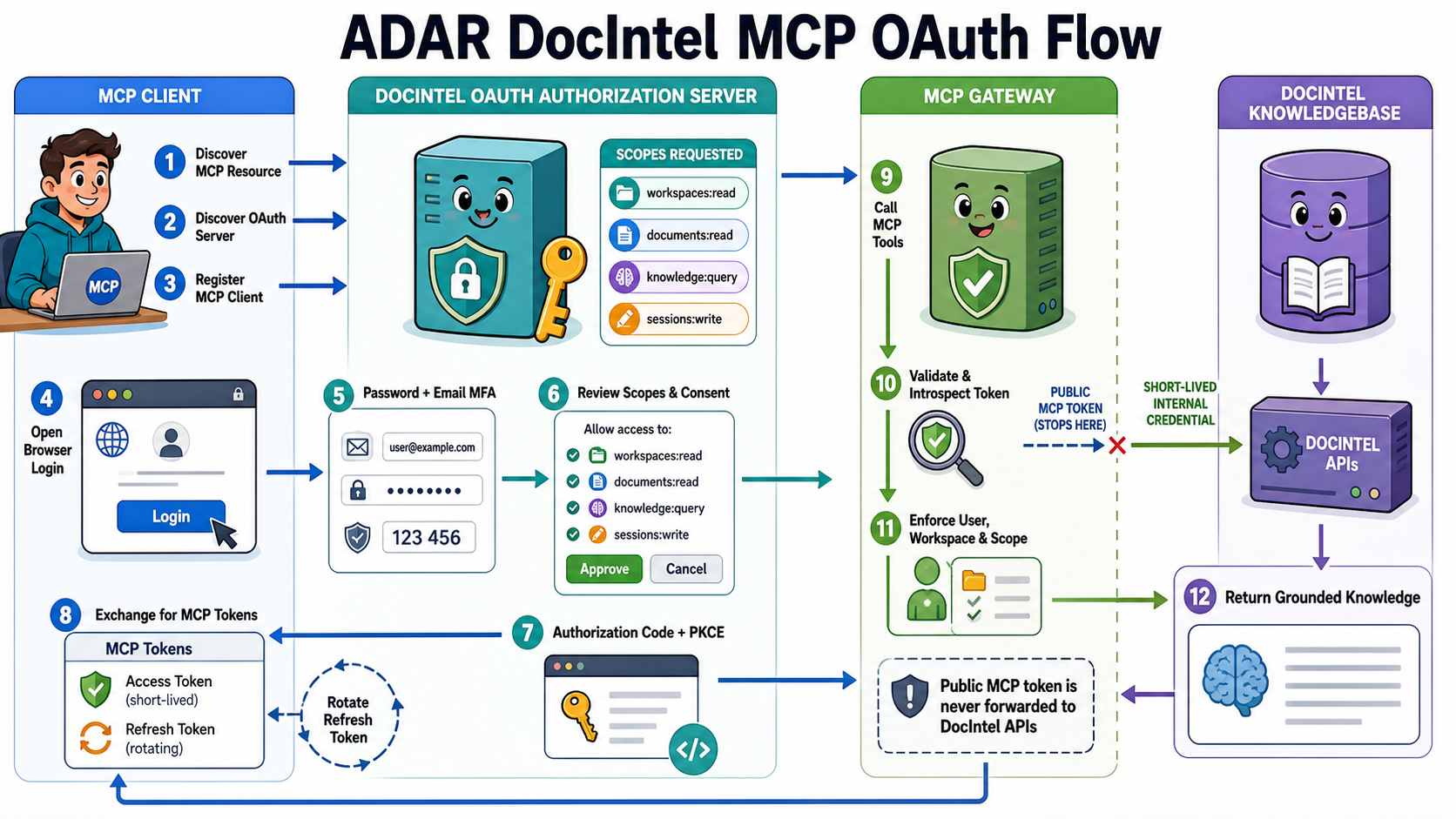
Security Boundary

Built for Enterprise Governance, Not Token Copying

Caller identity is never accepted from tool arguments or custom headers. Every tool requires both an operator-enabled capability and a caller-granted OAuth scope. DocIntel validates requested scopes before authorization-code issuance, code exchange, refresh-token rotation, token introspection, and every tool or resource call. Workspace IDs and document IDs narrow a request, but they do not grant access. Tokens, document contents, questions, and generated answers are excluded from gateway logs, and correlation IDs are forwarded through trace headers for safe operational visibility.

Developers and integration engineers

Connect applications and AI clients to DocIntel without rebuilding ingestion, retrieval, speech/video processing, authorization, and workflow services.

AI architects and agent builders

Create connected copilots and agent workflows that use standard MCP tools while preserving DocIntel's grounding, citations, sessions, workspace rules, and RAG architecture.

Security, IAM, compliance, and platform teams

Retain MFA, least-privilege scopes, tenant isolation, workspace boundaries, token controls, monitoring, traceability, and auditability.

Business and domain users

Work with authorized enterprise knowledge from preferred AI clients without moving files, sharing permanent credentials, or bypassing DocIntel governance.